0 ratings

Item #:
20702180
Odyson - 1TB SSD Replacement for Apple MacBook Pro 13 A1502, 15 A1398, Replacement for Apple Mac Pro A1481, 21.5 A1418, 27 A1419 Late 2013-Late 2014
Item #:
20702180
XCD 516
Price Details
Excluding Shipping & Custom charges ( Shipping and custom charges will be calculated on checkout )
*All items will import from US
0 ratings
Write a review
In stock
 Imported from USA store
QTY:
Order now and get it around Monday, July 13
Secured transaction
Ubuy works hard to protect your security and privacy. Our advanced payment security system ensures confidentiality by encrypting your information during transmission using AES (Advanced Encryption Standards) and SSL (Secure Socket Layer) protocols. Your payment details are 100% secure as we do not share your payment details with third party sellers.
Our Top Logistics Partners


Get a 1TB SSD (PCIe 2.0 x4) for your MacBook Pro and enjoy faster read/write speeds

Fast
Shipping

Free
Return*

Secure Packaging

100% Original Products

PCI DSS Compliance

ISO 27001 Certified


Note: Step Down Voltage Transformer required for using electronics products of US store (110-120). Recommended power converters Buy Now.


What Stands Out
High Capacity
The 1TB storage offers ample space for files and applications, catering to users needing substantial storage without sacrificing performance.
Compatible Fit
Designed specifically for various MacBook Pro and Mac Pro models, ensuring a perfect integration without the hassle of adapters or modifications.
Speed Enhancement
Significantly boosts system performance with faster data access and load times, solving slow boot or application launch issues faced by users.
Product Details
| Item Weight | 0.5 lbs (230 grams) |
Who Should Buy?

-
Creative Professionals
Ideal for photographers and videographers requiring fast storage for large files and efficient workflow management.
-
Upgrade Seekers
Perfect for users looking to enhance their MacBook's performance and storage capacity with a reliable replacement SSD.
-
Tech Enthusiasts
Great for users comfortable with hardware upgrades and wanting to improve their Mac's speed and longevity.

-
Casual Users
Not suitable for users with basic needs who may not require significant performance boosts or additional storage capacity.
-
Older Models
Incompatible with models outside the specified range, limiting its utility for users with older Mac devices.
-
Warranty-Conscious Users
Replacing internal components may void warranties, which can deter users who prefer keeping their devices under coverage.
Product Description
Odyson - 1TB SSD Replacement for Apple MacBook Pro 13 A1502, 15 A1398, Replacement for Apple Mac Pro A1481, 21.5 A1418, 27 A1419 Late 2013-Late 2014
About This Item
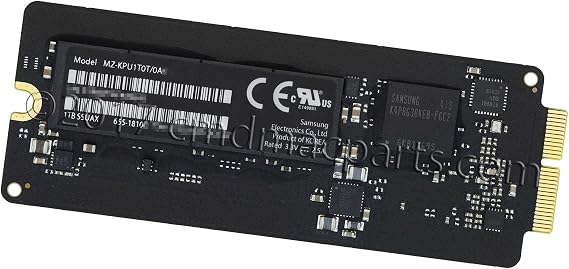
Introducing the Odyson 1TB SSD SSUAX, the perfect replacement for your MacBook Pro or Mac Pro. This high-speed SSD will provide you with the performance and storage capacity you need to take your device to the next level. Included in this package is the 1TB SSUAX SSD with a PCIe 2.0 x4 interface, ensuring fast and reliable data transfer. With the AHCI protocol and TRIM support, you can expect smooth operation and improved overall performance. Whether you own a MacBook Pro Retina 13 A1502 or a MacBook Pro Retina 15 A1398, this SSD is compatible with various models.
From the Late 2013 to the Mid 2014 editions, you can upgrade your device and experience a significant boost in speed and efficiency. The Odyson SSD features a proprietary connector (12+16 Pin), ensuring compatibility and a hassle-free installation process. No need to worry about complex procedures or compatibility issues. Simply replace your old SSD with this high-quality alternative, and you're good to go. Equipped with the S4LN053X01-8030 controller, this SSD delivers reliability and stability, making it an excellent choice for both personal and professional use.
You can count on the Odyson SSD to handle your demanding tasks and store your important files securely. With a printed part number of 655-1810 and an APN of 661-8142, you can be confident in the authenticity and quality of this product. The manufacturer part number, MZ-KPU1T0T/0A6, further ensures that you are getting a genuine Odyson SSD. Upgrade your MacBook Pro or Mac Pro with the best SSD on the market. Experience faster boot times, quicker file transfers, and improved overall performance.
Don't settle for less when it comes to your device's storage. Choose the Odyson 1TB SSD SSUAX and take your device to new heights.
Have any Query? Chat with us
Customer Questions & Answers
-
Question:
What are the key features of the Odyson 1TB SSD Replacement?
Answer: The Odyson 1TB SSD Replacement boasts fast data transfer speeds, improved durability, and a lightweight design tailored for Apple MacBook Pro models A1502 and A1398, as well as Mac Pro A1481, A1418, and A1419. Its flash memory architecture ensures data integrity and efficiency, providing a robust upgrade for your device. Users seeking to enhance their Mac's performance, especially for tasks like video editing and gaming, will find that the Odyson SSD significantly reduces load times and boosts overall responsiveness. -
Question:
Is the Odyson 1TB SSD compatible with my MacBook Pro?
Answer: Yes, the Odyson 1TB SSD Replacement is compatible with MacBook Pro models 13 A1502 and 15 A1398, as well as Mac Pro A1481, 21.5 A1418, and 27 A1419 from late 2013 to late 2014. To verify compatibility, you can check your device's model number, usually found on the bottom casing. This SSD is an excellent fit for users looking to upgrade their storage without compromising performance, allowing for seamless multitasking and improved system responsiveness. -
Question:
How does the Odyson 1TB SSD improve my Mac's performance?
Answer: The Odyson 1TB SSD enhances your Mac's performance by significantly reducing boot times and application load times compared to traditional hard drives. With quicker data access and storage capabilities, tasks such as rendering videos or opening large files become more efficient. This upgrade is perfect for professionals and creatives who rely on speed and efficiency in their workflow, making your Mac feel like new again. -
Question:
What is the installation process for the Odyson SSD?
Answer: Installing the Odyson 1TB SSD Replacement involves opening the MacBook case, removing the old hard drive, and securely placing the new SSD in its slot. Detailed guides and resources can often be found online to assist you through the process. This enhances the experience for DIY enthusiasts or tech-savvy users looking to perform their own upgrades, ensuring minimal downtime and maximizing productivity. -
Question:
What benefits does an SSD have over a traditional hard drive?
Answer: An SSD, like the Odyson 1TB, offers numerous advantages over traditional hard drives, including faster data access speeds, lower power consumption, and increased shock resistance. This results in quicker boot times, application launches, and file transfers. Users updating their storage for tasks such as gaming, graphic design, or software development will appreciate the noticeable improvements in performance and reliability. -
Question:
How can I backup my data before installing the Odyson SSD?
Answer: Before installing the Odyson 1TB SSD, it's crucial to back up your data. You can use Time Machine, Apple's built-in backup software, or manually copy files to an external drive or cloud storage. Ensuring your data is safeguarded helps prevent any loss during the upgrade. This practice is essential for anyone planning to maximize their data security during hardware upgrades. -
Question:
What tools do I need to install the Odyson SSD?
Answer: To install the Odyson 1TB SSD Replacement, you'll need a P5 screwdriver, a Phillips screwdriver, and a spudger for safely opening your MacBook. Having these tools on hand simplifies the installation process. This setup provides an opportunity for individuals comfortable with hardware modifications to enhance their system's performance efficiently. -
Question:
Will I need to format the Odyson SSD after installation?
Answer: Yes, after installing the Odyson 1TB SSD, you'll likely need to format it using Disk Utility to ensure your Mac recognizes the new drive. This is a straightforward process, allowing you to select format options such as APFS or Mac OS Extended Journaled based on your needs. This step is necessary for users who are transitioning from an older drive to ensure compatibility and optimize performance. -
Question:
Where can I buy Odyson - 1TB SSD Replacement for Apple Mac models?
Answer: You can purchase the Odyson - 1TB SSD Replacement for your Apple MacBook Pro and Mac Pro models from Ubuy in Saint Lucia. Ubuy offers a variety of electronic products, including high-quality SSDs, making it a reliable choice for your upgrade needs. By choosing Ubuy, you can trust in their customer service and seamless purchasing experience. -
Question:
What should I do if my Mac does not recognize the Odyson SSD after installation?
Answer: If your Mac does not recognize the Odyson 1TB SSD after installation, first, check the connections to ensure the SSD is securely seated. If the issue persists, you may need to boot into recovery mode to format the drive via Disk Utility. This scenario is common among first-time installers, highlighting the importance of double-checking hardware connections and following proper formatting procedures.
Odyson Internal Solid State Drives Editorial Review
No editorial reviews found
Customer Reviews & Ratings
1 customers ratings
-
5 Star
100%
-
4 Star
0%
-
3 Star
0%
-
2 Star
0%
-
1 Star
0%
Review this product
Share your thoughts with other customers
Product Price History
Important information
- Limitations : For products shipped internationally, please note that any manufacturer warranty may not be valid; manufacturer service options may not be available; product manuals, instructions, and safety warnings may not be in destination country languages; the products (and accompanying materials) may not be designed in accordance with destination country standards, specifications, and labeling requirements; and the products may not conform to destination country voltage and other electrical standards (requiring use of an adapter or converter if appropriate). The recipient is responsible for assuring that the product can be lawfully imported to the destination country. When ordering from Ubuy or its affiliates, the recipient is the importer of record and must comply with all laws and regulations of the destination country.
- Not all the products listed on Ubuy are for sale, as Ubuy is a global search engine. Products are subject to export/trade regulations.
XCD 516
Order now and get it around Monday, July 13
This item is not restrict in my country.(Please click on above link if this item is not restrict in your country, So our team will review and allow.)
QTY:
Secured transaction
Ubuy works hard to protect your security and privacy. Our advanced payment security system ensures confidentiality by encrypting your information during transmission using AES (Advanced Encryption Standards) and SSL (Secure Socket Layer) protocols. Your payment details are 100% secure as we do not share your payment details with third party sellers.
Our Top Logistics Partners
Fastest cross-border delivery
Features & Benefits
- 1TB SSD (PCIe 2.0 x4) included
- Compatible with Late 2013 and Mid 2014 MacBook Pro models
- Faster read/write speeds compared to regular HDDs
- TRIM support included
- No operating system included
- APN: 661-8142 Manufacturer Part #: 655-1810*, MZ-KPU1T0T/0A*