
0 ratings
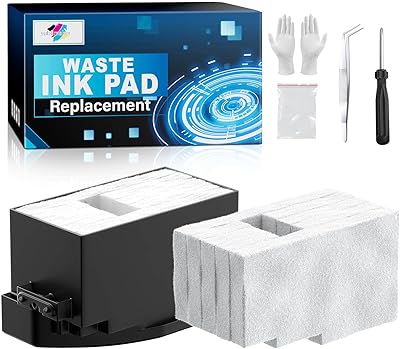
Waste Ink Pad Replacement with Reset Software for XP-830 XP-640 XP-530 XP-630 XP-7100 XP-850 XP-950 XP-860 XP-960 XP-810 XP-820 XP-600 XP-520 Printers, Maintenance Box with Extra Sponge
Replacing the waste ink pad and using the reset software will resolve the printer E-11 error code.
Waste Ink Pad Replacement with Reset Software for XP-830 XP-640 XP-530 XP-630 XP-7100 XP-850 XP-950 XP-860 XP-960 XP-810 XP-820 XP-600 XP-520 Printers, Maintenance Box with Extra Sponge
Item #: 167389219

Waste Ink Pad Replacement with Reset Software for XP-830 XP-640 XP-530 XP-630 XP-7100 XP-850 XP-950 XP-860 XP-960 XP-810 XP-820 XP-600 XP-520

Item #: 167389219

XCD 108

Price Details

Excluding Shipping & Custom charges ( Shipping and custom charges will be calculated on checkout )

*All items will import from US

0 ratings Write a review
Out of stock
us Imported from USA store
Our Top Logistics Partners
  • fedex
  • dhl
Replacing the waste ink pad and using the reset software will resolve the printer E-11 error code.
U-Care Warranty:
None
Select a Plan
fast shipping

Fast
Shipping

free return

Free
Return*

secure packaging

Secure Packaging

100% original products

100% Original Products

pci-dss

PCI DSS Compliance

iso certified

ISO 27001 Certified


paypal payment
visa payment
mastercard payment
Note: Step Down Voltage Transformer required for using electronics products of US store (110-120). Recommended power converters Buy Now.

What Stands Out

Reset Software Included
The product comes with reset software, enabling users to easily reset their printer's waste ink counter, ensuring continued optimal performance without complex procedures.
Versatile Compatibility
Designed for a wide range of Epson printers, this replacement can service models like XP-830, XP-640, and more, making it a versatile solution for various users.
Premium Maintenance Box
Equipped with an extra sponge, this maintenance box enhances durability and efficiency, delivering reliable waste ink management and reducing the frequency of replacements.

Product Details

Shop Waste Ink Pad Replacement with Reset Software for XP-830 XP-640 XP-530 XP-630 XP-7100 XP-850 XP-950 XP-860 XP-960 XP-810 XP-820 XP-600 XP-520 Printers, Maintenance Box with Extra Sponge online at a best price in Saint Lucia. B0FGCRGC8H
Item Weight0.5 lbs (230 grams)

Who Should Buy?

Suitable For
  • Frequent Users

    Ideal for users who print regularly and need to replace waste ink pads to maintain printer performance.

  • DIY Repair Enthusiasts

    Perfect for users comfortable with maintenance tasks, allowing them to tackle the replacement and reset independently.

  • Cost-Conscious Consumers

    Great for budget-conscious users who want to avoid costly professional servicing for printer maintenance.

Not Suitable For
  • Occasional Printers

    Not suitable for infrequent users, as waste pad issues may not arise during their limited use.

  • Non-Technical Users

    Users unfamiliar with printer maintenance might find the replacement process involving reset software intimidating.

  • New Printers

    Not recommended for recent printer models that may not require waste ink pad replacement yet.

Product Description

Waste Ink Pad Replacement with Reset Software for XP-830 XP-640 XP-530 XP-630 XP-7100 XP-850 XP-950 XP-860 XP-960 XP-810 XP-820 XP-600 XP-520 Printers, Maintenance Box with Extra Sponge

Have any Query? Chat with us

Customer Questions & Answers

  • Question: What is a Waste Ink Pad Replacement kit?

    Answer: A Waste Ink Pad Replacement kit is designed to replace the absorbent pads within your printer that collect excess ink during the printing process. Over time, these pads can become saturated and need to be replaced to maintain printer performance and prevent ink overflow. This kit often includes reset software to inform the printer that the pads have been replaced, allowing you to continue using your printer without errors.
  • Question: What printers are compatible with this waste ink pad replacement?

    Answer: This waste ink pad replacement kit is compatible with various models including XP-830, XP-640, XP-530, XP-630, XP-7100, XP-850, XP-950, XP-860, XP-960, XP-810, XP-820, XP-600, and XP-520. Each model comes with specific requirements for installation, so it's essential to confirm compatibility before purchase. Having the right kit ensures optimal performance and longevity of your printer.
  • Question: How do I install the Waste Ink Pad Replacement?

    Answer: Installation typically involves turning off the printer, carefully opening the casing, and removing the old waste ink pads. Once the old pads are removed, the new ones can be installed in their place. The reset software is crucial as it resets the printer's internal counter, allowing it to recognize the replacement. Following the manufacturer's instructions will ensure a successful installation, making sure your printer operates correctly.
  • Question: Why do waste ink pads need to be replaced?

    Answer: Waste ink pads collect ink that is purged from the printhead during cleaning cycles, and over time they become full. If they are not replaced, it can lead to ink overflow, potentially damaging your printer and affecting print quality. Regular replacement is important for maintaining the printer’s functionality and preventing costly repairs or replacements.
  • Question: What are the signs that my waste ink pads need replacing?

    Answer: Signs include frequent 'ink pad near full' error messages, visible ink leakage around the printer, or poor print quality. If your printer indicates an error related to waste ink pads, immediate replacement is advised to avoid further complications. Being proactive ensures that your printer remains in optimal condition and avoids any operational interruptions.
  • Question: Can I use generic waste ink pad replacements?

    Answer: Yes, there are generic options available for waste ink pad replacements. However, quality can vary greatly. Using high-quality, compatible pads ensures a better fit and reduces the risk of leaks or errors in your printer. Opting for reputable brands or kits specifically designed for your printer model can provide reliable performance and ease of installation.
  • Question: What tools do I need for the installation process?

    Answer: Typically, you will need a basic screwdriver to access your printer's internals, along with the provided replacement pads and reset software. Depending on the printer model, you may also need scissors to trim the pads if necessary. Having a clean workspace and following instructions closely will help streamline the installation process.
  • Question: How does reset software work with waste ink pad replacements?

    Answer: Reset software is used to clear the waste ink counter within your printer's memory. After replacing the pads, running this software allows the printer to reset any alerts indicating full waste ink pads. This step is crucial as it permits continued use of the printer, ensuring it recognizes that maintenance has been performed and avoiding error messages.
  • Question: Is installation of the waste ink pad replacement complicated?

    Answer: Installation can be straightforward if you follow detailed instructions or guidelines. Most users with basic technical skills can handle the process, as it involves minimal disassembly of the printer. For those less technical, instructional videos or guides can provide step-by-step support, making the process more accessible and manageable.
  • Question: Where can I buy Waste Ink Pad Replacement with Reset Software for my printer in Saint Lucia?

    Answer: You can purchase the Waste Ink Pad Replacement with Reset Software for your printer at Ubuy. They offer a variety of options tailored to different printer models, ensuring you find the right fit for your needs. With Ubuy, you also benefit from a user-friendly shopping experience and access to product reviews to assist in making informed decisions.

SUBLIMAKER Sublimation Ink Refills & Kits Editorial Review

No editorial reviews found

Customer Reviews & Ratings

5.0
1 customers ratings
  • 5 Star
    100%
  • 4 Star
    0%
  • 3 Star
    0%
  • 2 Star
    0%
  • 1 Star
    0%

Review this product

Share your thoughts with other customers

Product Price History

Important information

  • Limitations : For products shipped internationally, please note that any manufacturer warranty may not be valid; manufacturer service options may not be available; product manuals, instructions, and safety warnings may not be in destination country languages; the products (and accompanying materials) may not be designed in accordance with destination country standards, specifications, and labeling requirements; and the products may not conform to destination country voltage and other electrical standards (requiring use of an adapter or converter if appropriate). The recipient is responsible for assuring that the product can be lawfully imported to the destination country. When ordering from Ubuy or its affiliates, the recipient is the importer of record and must comply with all laws and regulations of the destination country.
  • Not all the products listed on Ubuy are for sale, as Ubuy is a global search engine. Products are subject to export/trade regulations.