- Home Page /
- Office Products /
- Office Electronics /
- Printers & Accessories /
- Printer Parts & Accessories /
- Printer Ink & Toner /
- Inkjet Ink Cartridges /
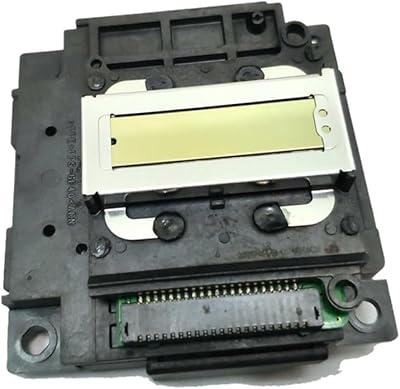
- Printhead for L300 L301 L351 L355 L358 L111 M...
0 ratings

Item #:
144407623
Printhead for L300 L301 L351 L355 L358 L111 ME303 L120 L210 L211 ME401 XP 402 405 2010 2510
Item #:
144407623
XCD 288
Price Details
Excluding Shipping & Custom charges ( Shipping and custom charges will be calculated on checkout )
*All items will import from US
0 ratings
Write a review
In stock
 Imported from USA store
QTY:
Order now and get it around Friday, September 11
Secured transaction
Ubuy works hard to protect your security and privacy. Our advanced payment security system ensures confidentiality by encrypting your information during transmission using AES (Advanced Encryption Standards) and SSL (Secure Socket Layer) protocols. Your payment details are 100% secure as we do not share your payment details with third party sellers.
Our Top Logistics Partners


Delivers smooth ink flow for text and photo output.

Fast
Shipping

Free
Return*

Secure Packaging

100% Original Products

PCI DSS Compliance

ISO 27001 Certified


Note: Step Down Voltage Transformer required for using electronics products of US store (110-120). Recommended power converters Buy Now.


What Stands Out
Broad Compatibility
This printhead is compatible with a range of models, ensuring versatility and convenience for users with various printers, including L300, L301, and XP series.
High Efficiency
Engineered for optimal performance, this printhead delivers clear, vibrant prints quickly, addressing user needs for speed without sacrificing quality.
Easy Installation
Designed for hassle-free installation, this printhead allows users to replace it quickly, minimizing downtime and enhancing overall printing productivity.
Product Details
| Package Dimensions | 0.39 x 0.39 x 0.39 inches (1 x 1 x 1 cm) |
| Item Weight | 1.76 ounces (49.9 grams) |
| Department | unisex-adult |
| Manufacturer | JaYYue |
| Item model number | JaYYue08067 |
| Assembly required | No |
| Number of pieces | 1 |
Who Should Buy?

-
Frequent Users
Ideal for users who print regularly and require a reliable printhead for consistent results.
-
Office Environments
Great for office settings where multiple users need high-volume printing for reports and documents.
-
Replacement Needs
Perfect for individuals needing a quick replacement due to wear or malfunction of original printheads.

-
Infrequent Printers
Not suitable for users who rarely print, as a printhead may dry out without regular use.
Product Description
Printhead for L300 L301 L351 L355 L358 L111 ME303 L120 L210 L211 ME401 XP 402 405 2010 2510
Have any Query? Chat with us
Customer Questions & Answers
-
Question:
What types of printers are compatible with the Printhead for L300, L301, L351, L355, L358, L111, ME303, L120, L210, L211, ME401, XP 402, 405, 2010, 2510?
Answer: The Printhead is specifically designed for a range of Epson printers, including models like L300, L301, L351, and others listed. This compatibility is crucial as it ensures optimal performance and high-quality print output. These printers often serve both home and office environments, making the Printhead an essential component for maintaining efficiency and quality in day-to-day printing tasks. -
Question:
How do I know if my Printhead needs replacement?
Answer: Signs that your Printhead may need replacement include streaky or blurred prints, inconsistent ink distribution, and frequent paper jams during printing. Regularly checking print quality helps identify these issues early. Understanding these signs can help you maintain your printer effectively and prevent interruptions in your work or personal printing tasks. -
Question:
Can I install the Printhead myself, or do I need a technician?
Answer: Yes, you can typically install the Printhead yourself with some basic technical knowledge. Start by referring to the printer’s user manual for step-by-step instructions. It is essential to follow these steps carefully to avoid damage. For instance, if you’re comfortable with minor repairs, this task can be a great way to save time and money while ensuring your printer runs smoothly. -
Question:
What is the average lifespan of a Printhead for these models?
Answer: The lifespan of a Printhead can vary based on the frequency of use and the type of printing tasks performed. Generally, Printheads can last many pages, depending on print settings and maintenance. Regular use of high-quality ink can extend their lifespan significantly. Identifying your printing habits can help gauge when it’s best to consider a replacement for optimal printing performance. -
Question:
What should I do if the Printhead is not recognized by my printer?
Answer: If the Printhead is not recognized, ensure it has been correctly installed and is fully seated in its slot. Check for any protective tape that may not have been removed. If these steps don’t resolve the issue, resetting the printer may help. Understanding printing mechanics can assist in troubleshooting such issues, making it easier to get back to efficient printing. -
Question:
Is it possible to refill the Printhead ink, or should I replace it entirely?
Answer: While some users attempt to refill Printhead ink, it is often recommended to replace the Printhead entirely for optimal performance. Refilled heads may lead to inconsistent quality and could potentially damage the printer. By replacing the Printhead, you ensure consistent quality, especially for high-volume printing tasks, thus enhancing your productivity. -
Question:
Does using third-party inks affect Printhead performance?
Answer: Yes, using third-party inks can impact the performance and lifespan of your Printhead. Non-genuine inks can cause clogging and inconsistencies, leading to print quality issues. It’s advisable to use inks specifically designed for your printer model to ensure the longevity and reliability of your Printhead, ultimately supporting optimal printing for your projects. -
Question:
How can I maintain my Printhead for better performance?
Answer: To maintain your Printhead, perform regular cleaning cycles available in your printer’s settings and check for ink levels frequently. Keeping the printer in a dust-free environment helps reduce the risk of clogging. Regular maintenance not only ensures quality prints but also prolongs the life of the Printhead, making it a vital part of effective printer management. -
Question:
What ink types should be used with this Printhead?
Answer: It is recommended to use ink specifically formulated for Epson models compatible with this Printhead. Using genuine or high-quality ink reduces the risk of clogging and ensures consistent print quality. Selecting the right ink type plays a significant role in achieving vibrant colors and sharp details in your prints, making it an essential consideration for any regular user. -
Question:
Where can I buy Printhead for L300 L301 L351 L355 L358 L111 ME303 L120 L210 L211 ME401 XP 402 405 2010 2510 in Saint Lucia?
Answer: You can purchase the Printhead for the mentioned models on Ubuy. Ubuy offers a wide selection of printer accessories and ensures that you have access to quality products that fit your printer's specifications. By shopping on Ubuy, you can conveniently browse through options and find the Printhead that meets your needs, ensuring optimal printing performance.
JaYYue Inkjet Ink Cartridges JaYYue08067 Editorial Review
No editorial reviews found
Customer Reviews & Ratings
1 customers ratings
-
5 Star
0%
-
4 Star
100%
-
3 Star
0%
-
2 Star
0%
-
1 Star
0%
Review this product
Share your thoughts with other customers
Platform Trust & Buyer Confidence

MT
Mohd
Verified buyer
“The product received very good packaging & safe…Thank You”
16 June 2026 · via Trustpilot
SJ
Shawati
Verified buyer
“Accurate delivery timing given”
16 June 2026 · via Trustpilot
YB
Youcef
Verified buyer
“Not madly expensive like I thought, and much quicker than promised.”
15 June 2026 · via Trustpilot
LM
Leila
Verified buyer
“Never dealt with Ubuy before, but everything worked out great. Seamless cross border purchasing and shipping. Thanks!”
6/7/2026 · via Trustpilot
KA
Kwame
Verified buyer
“The process was smooth, with clear communication and timelines. This was my 1st purchase and I am really impressed. I will definitely be coming back.”
12 June 2026 · via Trustpilot
Secure Checkout
Global Delivery
Easy Returns
Genuine Products
Product Price History
Important information
- Limitations : For products shipped internationally, please note that any manufacturer warranty may not be valid; manufacturer service options may not be available; product manuals, instructions, and safety warnings may not be in destination country languages; the products (and accompanying materials) may not be designed in accordance with destination country standards, specifications, and labeling requirements; and the products may not conform to destination country voltage and other electrical standards (requiring use of an adapter or converter if appropriate). The recipient is responsible for assuring that the product can be lawfully imported to the destination country. When ordering from Ubuy or its affiliates, the recipient is the importer of record and must comply with all laws and regulations of the destination country.
- Not all the products listed on Ubuy are for sale, as Ubuy is a global search engine. Products are subject to export/trade regulations.
XCD 288
Order now and get it around Friday, September 11
This item is not restrict in my country.(Please click on above link if this item is not restrict in your country, So our team will review and allow.)
QTY:
Secured transaction
PCI DSS compliant and ISO 27001:2022 certified, with encrypted payments and full buyer protection on every order.
Our Top Logistics Partners
Fastest cross-border delivery
Features & Benefits
- Compatible with multiple models including L300, L301, L351, and more.
- Provides high-quality printing for both text and photos.
- Features standard nozzle construction for reliability.
- Easy to install with a simple plug-and-play process.
- Maintenance-friendly design prevents ink drying and clogging.
- Ideal for users seeking consistent and durable print performance.
Ubuy Assurance
Experience worry-free shopping with 100% original products, PCI DSS-compliant payment security, ISO 27001-certified data protection, the fastest cross-border delivery, free returns *, and secure packaging on every order.