0 ratings


Item #:
112867406
Mac mini M4 Dock, Aluminum Stand and HDMI Hub for Mac mini M4 and M4 Pro 2024 with M.2 NVMe/SATA SSD Enclosure, 4K60Hz HDMI,10G USB A/C, 5G USB A*2,
88% of respondents would recommend this to a friend
Item #:
112867406
XCD 226
Price Details
Excluding Shipping & Custom charges ( Shipping and custom charges will be calculated on checkout )
*All items will import from US
5%
In stock
 Imported from USA store
QTY:
Only 10 items left in stock.
Order now and get it around Wednesday, July 29
Secured transaction
Ubuy works hard to protect your security and privacy. Our advanced payment security system ensures confidentiality by encrypting your information during transmission using AES (Advanced Encryption Standards) and SSL (Secure Socket Layer) protocols. Your payment details are 100% secure as we do not share your payment details with third party sellers.
Our Top Logistics Partners


This 10-in-1 Mac mini hub equipped with mount and Hub together with M.2 SSD enclosure fits NVMe/SATA M.2 SSD and expands the function and memory for your Mac Mini M4.

Fast
Shipping

Free
Return*

Secure Packaging

100% Original Products

PCI DSS Compliance

ISO 27001 Certified


Note: Step Down Voltage Transformer required for using electronics products of US store (110-120). Recommended power converters Buy Now.


What Stands Out
Versatile Docking
Transform your Mac Mini M4 into a full-fledged workstation with a comprehensive dock that includes multiple connectivity options while maintaining a sleek aluminum design.
High-Performance HDMI
Experience stunning visuals with 4K resolution at 60Hz through HDMI, ensuring your media looks vibrant and crisp, perfect for creative professionals and entertainment enthusiasts.
Efficient Storage
Easily connect M.2 NVMe/SATA SSDs for expanded storage capabilities, maximizing your Mac Mini's potential for data-heavy applications without compromising speed and accessibility.
Product Details
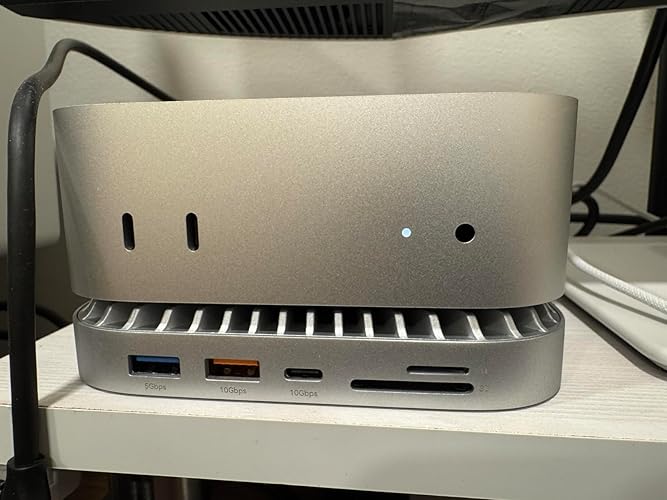
- 【USB-C Hub for Mac Mini Dock & Stand】 This 10-in-1 Mac mini hub equipped with mount and Hub together with M.2 SSD enclosure fits NVMe/SATA M.2 SSD, 4K60Hz HDMI,10G USB A/C, 5G USB A*2, USB-C Charge, SD/TF and Audio. Extremely expand the function and extend memory for your Mac Mini M4.
- 【Support 8TB M.2 NVME/SATA Enclosure】This Mac Mini docking station is equipped with a built-in Hard Drive enclosure, capable of running M.2 NVME/SATA, Supports up to 8TB and most SSD sizes (M.2 2230/2242/2260/2280). NOTE: Connect the extra USB-C charging port (back of the dock) for adequate power supply when using hard drivers in case of disconnects.
- 【4K HDMI HD Output】USB C hub HDMI port output up to 4K@60Hz, it can perfectly mirror or extend your screen to HDTV, monitor or projector, suitable for full HD movies, 3D video Games, office meetings and entertainment. Surf the web, watch video clips, and transfer data, all in one. Bringing you vivid video synchronization.(Note that this product only has one HDMI port, so only one external monitor is supported)
- 【Superspeed Data Transfer--10Gbps】The Mac Mini Dock with10Gbps USB-A and 10Gbps USB-C data . Their super-speed data transfer is ideal for drive and HDD devices! The Mac Mini Stand also offers 5G USB A*2 ports to connect your wireless keyboard and mouse.
- 【Design For Mac Mini4 and M4 Pro 2024】Designed to feel like a natural extension of your M4 Mac mini with an elegant, brushed finish and silver aluminum alloy. Our dock station supports M4/ M4 Pro Mac Mini and 2024 Mac Mini. And it is also for a USB-C laptop.
| Hardware Interface | HDMI, MicroSD, USB 3.2 Gen 2×2, USB Type C |
| Additional Features | Portable |
| Compatible Devices | Mac Mini M4 Pro, Mac Mini 2024, Mac Mini M4 |
| Total Usb Ports | 5 |
| Data Transfer Rate | 10 Gigabits Per Second |
| Number of Ports | 10 |
| Minimum Required Operating System Version | Mac OS 12 Monterey |
| Operating System | macOS |
| Color | silver |
| Enclosure Material | Aluminum |
| Brand | RayCue |
| Manufacturer | RayCue |
| Unit Count | 1.0 Count |
| Special Feature | Portable |
| Item Weight | 2.5 lbs (1.13 kg) |
Who Should Buy?

-
Creative Professionals
Ideal for graphic designers and video editors needing high-speed data transfer and multiple connectivity options.
-
Gaming Enthusiasts
Perfect for gamers requiring high-resolution output and fast data access for gameplay and streaming.
-
Tech Savvy Users
Great for users who want to maximize their Mac Mini's capabilities with enhanced connectivity and storage options.

-
Casual Users
Less suitable for individuals who only perform basic tasks like web browsing or document editing.
-
Budget-Conscious Buyers
Not the best choice for users looking for cost-effective solutions without premium features.
-
Non-Mac Users
Incompatible with systems other than Mac, limiting usability for users with different operating systems.
Product Description
Have any Query? Chat with us
Related Searches
Customer Questions & Answers
-
Question:
What are the primary functions of the Mac Mini M4 Dock?
Answer: The Mac Mini M4 Dock serves multiple essential functions for your Mac Mini M4 and M4 Pro setup. Primarily, it provides convenient connectivity options with a 4K60Hz HDMI output for high-resolution video, multiple USB ports including 10G USB AC and 5G USB A2 for fast data transfer, and an M.2 NVMe/SATA SSD enclosure for expandable storage. This dock enhances your workstation by enabling smooth multitasking, high-speed data transfers, and seamless display management. For instance, a creative professional can connect multiple devices and an external display, increasing productivity during design projects. -
Question:
Is the dock compatible with Mac Mini M4 and M4 Pro models?
Answer: Yes, the Mac Mini M4 Dock is specifically designed for compatibility with Mac Mini M4 and M4 Pro models. It ensures seamless connection and optimal performance by aligning with the ports and specifications of these devices. This compatibility allows users to leverage the full capabilities of their Mac Mini without any hassle. For example, a user upgrading from an older model will appreciate that all functionalities remain intact and enhanced through this dock setup. -
Question:
How does the aluminum stand benefit my setup?
Answer: The aluminum stand included with the Mac Mini M4 Dock elevates your Mac Mini to eye level, promoting better ergonomics and airflow. This design improves comfort during prolonged use, allowing you to maintain a natural viewing angle, which can help reduce neck strain. Additionally, the stand contributes to organized workspaces by decluttering the area underneath and providing an attractive aesthetic. Professionals working in design or tech can especially benefit from this layout, helping to create a visually appealing workspace. -
Question:
What advantages does the HDMI hub provide?
Answer: The HDMI hub integrated into the Mac Mini M4 Dock allows for high-definition video output at 4K60Hz, making it ideal for connecting to high-resolution displays or projectors. This capability is crucial for users who require sharp image quality for work presentations, video editing, or gaming. By connecting multiple displays, users can expand their screen real estate, improving multitasking. For instance, a developer can utilize dual monitors to code on one screen while testing applications on another, enhancing workflow efficiency. -
Question:
Can I use this dock with other devices?
Answer: While the Mac Mini M4 Dock is tailored for Mac Mini M4 and M4 Pro models, it can also be compatible with other devices that support similar HDMI and USB connections. However, optimal performance is ensured primarily with the designated Mac models, given the specialized features like the M.2 NVMe/SATA SSD enclosure. Users with alternative devices may find it useful for connecting peripherals or displays, but they should verify compatibility. For instance, you could connect the dock to a laptop for additional ports or display solutions. -
Question:
What type of SSD can I use with the M.2 enclosure?
Answer: The M.2 NVMe/SATA SSD enclosure included with the dock supports both NVMe and SATA SSDs, allowing users to choose the storage type that best fits their needs. NVMe SSDs offer superior speed for resource-intensive tasks, while SATA SSDs can provide more economical storage options for everyday use. This flexibility lets users customize their setup based on personal storage requirements, whether for high-performance gaming, video editing, or simple file storage. A content creator might opt for an NVMe SSD to enhance rendering speeds, thus increasing productivity. -
Question:
What is the benefit of the 10G USB AC and 5G USB A2 ports?
Answer: The 10G USB AC and 5G USB A2 ports on the Mac Mini M4 Dock offer rapid data transfer rates for connected devices. The 10G USB AC port is perfect for high-speed data transfer with compatible peripherals, while the 5G USB A2 port serves general connectivity needs for standard devices. This combination allows users to connect multiple devices ranging from external drives to printers, facilitating various workflows. For example, a video editor can quickly transfer large media files from an external SSD directly to the Mac Mini, streamlining their editing process. -
Question:
How does this dock fit into a home office setup?
Answer: The Mac Mini M4 Dock enhances any home office setup by providing organized connectivity, ergonomic positioning, and the capability for high-resolution displays. It consolidates cables and elevates your Mac Mini for an aesthetically pleasing workspace, promoting efficiency and comfort. With its array of ports, professionals can easily switch between devices such as monitors, external storage, and peripherals without clutter. For instance, a remote worker can maintain productivity with a dual-monitor setup and quick access to files on an SSD, making official tasks more streamlined. -
Question:
Where can I buy the Mac Mini M4 Dock, Aluminum Stand and HDMI Hub?
Answer: You can buy the Mac Mini M4 Dock, Aluminum Stand, and HDMI Hub from Ubuy in Saint Lucia. Ubuy offers a user-friendly shopping experience along with a selection of reliable delivery options to ensure that you receive your product promptly. With Ubuy, you can confidently shop from the comfort of your home, knowing that you have found a dedicated e-commerce platform that specializes in various electronics and accessories.
RayCue Docking Stations Editorial Review




No editorial reviews found
Customer Reviews & Ratings
789 customers ratings
-
5 Star
72%
-
4 Star
15%
-
3 Star
3%
-
2 Star
4%
-
1 Star
6%
Review this product
Share your thoughts with other customers
Platform Trust & Buyer Confidence

MT
Mohd
Verified buyer
“The product received very good packaging & safe…Thank You”
16 June 2026 · via Trustpilot
SJ
Shawati
Verified buyer
“Accurate delivery timing given”
16 June 2026 · via Trustpilot
YB
Youcef
Verified buyer
“Not madly expensive like I thought, and much quicker than promised.”
15 June 2026 · via Trustpilot
LM
Leila
Verified buyer
“Never dealt with Ubuy before, but everything worked out great. Seamless cross border purchasing and shipping. Thanks!”
6/7/2026 · via Trustpilot
KA
Kwame
Verified buyer
“The process was smooth, with clear communication and timelines. This was my 1st purchase and I am really impressed. I will definitely be coming back.”
12 June 2026 · via Trustpilot
Secure Checkout
Global Delivery
Easy Returns
Genuine Products
Top selling Mac mini M4 Dock in Thailand




Last Updated on June 16, 2026
Product Price History
Important information
- Limitations : For products shipped internationally, please note that any manufacturer warranty may not be valid; manufacturer service options may not be available; product manuals, instructions, and safety warnings may not be in destination country languages; the products (and accompanying materials) may not be designed in accordance with destination country standards, specifications, and labeling requirements; and the products may not conform to destination country voltage and other electrical standards (requiring use of an adapter or converter if appropriate). The recipient is responsible for assuring that the product can be lawfully imported to the destination country. When ordering from Ubuy or its affiliates, the recipient is the importer of record and must comply with all laws and regulations of the destination country.
- Not all the products listed on Ubuy are for sale, as Ubuy is a global search engine. Products are subject to export/trade regulations.
XCD 226
Order now and get it around Wednesday, July 29
This item is not restrict in my country.(Please click on above link if this item is not restrict in your country, So our team will review and allow.)
QTY:
Only 10 items left in stock.
Secured transaction
PCI DSS compliant and ISO 27001:2022 certified, with encrypted payments and full buyer protection on every order.
Our Top Logistics Partners
Fastest cross-border delivery
Features & Benefits
- 10-in-1 hub for expanded functionality.
- Supports M.2 NVME/SATA SSDs up to 8TB.
- Provides 4K@60Hz HDMI output for stunning visuals.
- Offers 10Gbps USB-A and USB-C data transfer speeds.
- Elegant design perfectly complements Mac Mini M4/M4 Pro 2024.
- Multiple connectivity options including SD/TF, USB-C charge, and audio.
Ubuy Assurance
Experience worry-free shopping with 100% original products, PCI DSS-compliant payment security, ISO 27001-certified data protection, the fastest cross-border delivery, free returns *, and secure packaging on every order.