0 ratings

Item #:
153808517
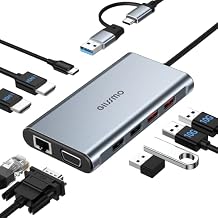
USB Docking Station Dual Monitor, GIISSMO 9-in-1 USB A 3.0 / USB C Docking Station Triple Monitor with 2 HDMI,VGA, 10Gbps USB 3.1, Gigabit Ethernet,
Item #:
153808517
XCD 229
Price Details
Excluding Shipping & Custom charges ( Shipping and custom charges will be calculated on checkout )
*All items will import from US
0 ratings
Write a review
In stock
 Imported from USA store
QTY:
Order now and get it around Friday, July 24
Secured transaction
Ubuy works hard to protect your security and privacy. Our advanced payment security system ensures confidentiality by encrypting your information during transmission using AES (Advanced Encryption Standards) and SSL (Secure Socket Layer) protocols. Your payment details are 100% secure as we do not share your payment details with third party sellers.
Our Top Logistics Partners


10-in-1 USB C Docking Station Dual Monitor: Effortlessly expand your setup and stream videos to multiple displays with plug and play functionality.

Fast
Shipping

Free
Return*

Secure Packaging

100% Original Products

PCI DSS Compliance

ISO 27001 Certified


Note: Step Down Voltage Transformer required for using electronics products of US store (110-120). Recommended power converters Buy Now.


What Stands Out
Versatile Connectivity
This docking station offers 13 ports, including dual HDMI and DisplayPort, ensuring seamless connection to multiple devices and monitors, enhancing productivity for professionals across various brands like MacBook, Dell, HP, and Lenovo.
High-Speed Data Transfer
Equipped with 10Gbps USB C/A, this hub guarantees rapid data transfer, allowing users to quickly sync large files and access data without delays, setting it apart from slower alternatives.
Power Delivery Support
With 100W Power Delivery, this docking station not only powers your laptop but also supports charging multiple devices simultaneously, eliminating the need for extra chargers and keeping your workspace tidy.
Product Details
| Item Weight | 1.5 lbs (680 grams) |
Who Should Buy?

-
Office Professionals
Ideal for multitasking with dual/triple monitor setups, enhancing productivity and efficient workflow in the workplace.
-
Gamers
Perfect for gamers needing multiple display options and high-speed connections for better gaming experiences.
-
Content Creators
Great for video editors and graphic designers requiring multiple outputs for enhanced visual editing and creative work.

-
Casual Users
Basic users who need limited connectivity may find this product overly complex and costly than necessary.
-
Mobile Workers
Frequent travelers may prefer lighter, portable alternatives instead of bulky docking stations.
-
Older Devices
Users with outdated laptops lacking USB-C ports or modern specifications may not benefit from this docking station.
Product Description
USB Docking Station Dual Monitor, GIISSMO 9-in-1 USB A 3.0 / USB C Docking Station Triple Monitor with 2 HDMI,VGA, 10Gbps USB 3.1, Gigabit Ethernet, Triple Display for Mac & MacBook & Windows Laptop
Have any Query? Chat with us
Customer Questions & Answers
-
Question:
What devices are compatible with the USB C Laptop Docking Station?
Answer: The USB C Laptop Docking Station is compatible with a wide range of devices including laptops, tablets, and smartphones that support USB C connectivity. This includes popular brands such as Dell, HP, Lenovo, MacBook, and Chromebook. It harnesses the power of USB C technology to deliver optimal performance for dual or triple monitor setups, making it ideal for professionals, gamers, or anyone needing multiple displays for enhanced productivity. -
Question:
How do I set up the 13 in 1 Docking Station?
Answer: Setting up the 13 in 1 Docking Station is straightforward. Simply connect it to your laptop via the USB C port, and then link your peripherals such as monitors, keyboards, and mice using the available ports. For multi-monitor configurations, connect your displays using the HDMI or DisplayPort connections. This versatility allows seamless multitasking, enabling users to project presentations or expand their workspace efficiently. -
Question:
What types of ports are available on this docking station?
Answer: The docking station features a comprehensive range of ports including two HDMI ports, one DisplayPort, an RJ45 Ethernet port for wired internet connectivity, multiple USB-A 3.1 ports, a USB C port for data transfer, and a power delivery port for charging. This variety ensures you can connect various devices simultaneously, making it perfect for both work and entertainment scenarios. -
Question:
Can I charge my laptop using the docking station?
Answer: Yes, the USB C Laptop Docking Station can charge your laptop through its 100W Power Delivery (PD) port. This feature allows for high-speed charging while simultaneously connecting peripherals. Users can enjoy a clutter-free workspace by having one connection for both power and data, which is especially useful during extensive work sessions or gaming marathons. -
Question:
Is dual or triple monitor support really effective?
Answer: Absolutely! The docking station supports dual or triple monitor configurations, enabling users to extend their display for increased productivity. This setup is ideal for professionals who require multiple screens for tasks like video editing, stock trading, or coding. The flexibility to use various display setups enhances workflow and allows for better multitasking capabilities. -
Question:
What is the data transfer speed of the USB ports?
Answer: The USB ports on the 13 in 1 Docking Station support a high-speed transfer rate of up to 10Gbps. This rapid data transfer is essential for efficiently moving large files, such as videos, images, and software applications. Users like photographers and videographers especially benefit from this feature, as they can quickly offload data from their devices without delay. -
Question:
How do I update the firmware for the docking station?
Answer: To update the firmware for your USB C Docking Station, you would typically install the manufacturer’s software provided on their website. Following the instructions, users can ensure their docking station’s performance is optimized and compatible with the latest updates from connected devices. Regularly checking for firmware updates enhances functionality, including port efficiency and device compatibility. -
Question:
Can I use this docking station with a gaming setup?
Answer: Yes, the USB C Laptop Docking Station is well-suited for gaming setups. Its dual and triple monitor support, high-speed USB connections, and ability to connect via HDMI or DisplayPort make it an excellent choice for gamers wanting a multi-screen experience. This allows for immersive gameplay and efficient management of game-related tasks or strategies across multiple displays. -
Question:
What is the significance of the RJ45 Ethernet port?
Answer: The RJ45 Ethernet port on the docking station provides a reliable wired internet connection, which is often faster and more stable than Wi-Fi. This is particularly important for activities requiring high bandwidth, such as gaming or video conferencing. Users working in areas with spotty Wi-Fi connectivity can greatly benefit from this port, ensuring a smooth online experience. -
Question:
Where can I buy USB C Laptop Docking Station?
Answer: You can purchase the USB C Laptop Docking Station at Ubuy, which offers a convenient shopping experience with a range of options for this multiport adapter. Ubuy is well-regarded for its reliable service and extensive product selection, ensuring you can find the docking station you need to enhance your workspace or entertainment setup.
GIISSMO Docking Stations Editorial Review
No editorial reviews found
Customer Reviews & Ratings
1 customers ratings
-
5 Star
100%
-
4 Star
0%
-
3 Star
0%
-
2 Star
0%
-
1 Star
0%
Review this product
Share your thoughts with other customers
Platform Trust & Buyer Confidence

MT
Mohd
Verified buyer
“The product received very good packaging & safe…Thank You”
16 June 2026 · via Trustpilot
SJ
Shawati
Verified buyer
“Accurate delivery timing given”
16 June 2026 · via Trustpilot
YB
Youcef
Verified buyer
“Not madly expensive like I thought, and much quicker than promised.”
15 June 2026 · via Trustpilot
LM
Leila
Verified buyer
“Never dealt with Ubuy before, but everything worked out great. Seamless cross border purchasing and shipping. Thanks!”
6/7/2026 · via Trustpilot
KA
Kwame
Verified buyer
“The process was smooth, with clear communication and timelines. This was my 1st purchase and I am really impressed. I will definitely be coming back.”
12 June 2026 · via Trustpilot
Secure Checkout
Global Delivery
Easy Returns
Genuine Products
Product Price History
Important information
- Limitations : For products shipped internationally, please note that any manufacturer warranty may not be valid; manufacturer service options may not be available; product manuals, instructions, and safety warnings may not be in destination country languages; the products (and accompanying materials) may not be designed in accordance with destination country standards, specifications, and labeling requirements; and the products may not conform to destination country voltage and other electrical standards (requiring use of an adapter or converter if appropriate). The recipient is responsible for assuring that the product can be lawfully imported to the destination country. When ordering from Ubuy or its affiliates, the recipient is the importer of record and must comply with all laws and regulations of the destination country.
- Not all the products listed on Ubuy are for sale, as Ubuy is a global search engine. Products are subject to export/trade regulations.
XCD 229
Order now and get it around Friday, July 24
This item is not restrict in my country.(Please click on above link if this item is not restrict in your country, So our team will review and allow.)
QTY:
Secured transaction
PCI DSS compliant and ISO 27001:2022 certified, with encrypted payments and full buyer protection on every order.
Our Top Logistics Partners
Fastest cross-border delivery
Features & Benefits
- Expand your workspace with 10 versatile ports.
- Supports dual displays for both Windows and Mac systems.
- Plug and play: No drivers or software installation required.
- Stable wired Ethernet connection for enhanced productivity.
- Fast data transfer with USB 3.1 ports and up to 100W charging.
- Perfect for professionals like photographers, designers, and video editors.
Ubuy Assurance
Experience worry-free shopping with 100% original products, PCI DSS-compliant payment security, ISO 27001-certified data protection, the fastest cross-border delivery, free returns *, and secure packaging on every order.