- Home Page /
- Electronics /
- Computer Accessories /
- Tablet Accessories /
- Bags, Cases & Sleeves /
- Keyboard Cases /
- Logitech Combo Touch iPad Pro 11-inch (1st, 2...
0 ratings





Item #:
84850990
Logitech Combo Touch iPad Pro 11-inch (1st, 2nd, 3rd, 4th gen - 2018, 2020, 2021, 2022) Keyboard Case - Detachable Backlit Keyboard, Click-Anywhere
85% of respondents would recommend this to a friend
Item #:
84850990
XCD 658
Price Details
Excluding Shipping & Custom charges ( Shipping and custom charges will be calculated on checkout )
*All items will import from US
16%
In stock
 Imported from USA store
QTY:
Order now and get it around Tuesday, June 30
Secured transaction
Ubuy works hard to protect your security and privacy. Our advanced payment security system ensures confidentiality by encrypting your information during transmission using AES (Advanced Encryption Standards) and SSL (Secure Socket Layer) protocols. Your payment details are 100% secure as we do not share your payment details with third party sellers.
Our Top Logistics Partners


Logitech Crayon uses Apple Pencil technology so you can write and draw naturally in pixel-perfect precision without missing a single line or detail.

Fast
Shipping

Free
Return*

Secure Packaging

100% Original Products

PCI DSS Compliance

ISO 27001 Certified


Note: Step Down Voltage Transformer required for using electronics products of US store (110-120). Recommended power converters Buy Now.


What Stands Out
Detachable Keyboard
Easily remove the keyboard when not needed, providing versatility for both typing and casual viewing, enhancing user experience across various tasks.
Backlit Keys
The adjustable backlit keyboard allows for comfortable typing in low-light conditions, improving productivity and usability, particularly for nighttime work or travel.
Multi-use Kickstand
The robust kickstand offers multiple viewing angles, catering to different activities such as typing, reading, or watching videos, ensuring convenience and adaptability in usage.
Product Details
- Compatibility: For iPad Pro 11-inch (1st, 2nd, 3rd, 4th gen) - A1980, A2013, A1934, A1979, A2228, A2068, A2230, A2231, A2377, A2459, A2301, A2460.Viewing Angles: 10°-60°
- Do it all with Combo Touch: Four versatile use modes allow you to type, sketch, view and read without ever having to remove your iPad Pro from the keyboard case
- Detachable keyboard and adjustable kickstand: Remove the keyboard when you're done typing for more flexibility and enjoy 50 degrees of adjustable viewing angles
- Large, click-anywhere trackpad: This iPad keyboard case features a responsive and reliable trackpad that allows you to use the entire surface to work and perform Multi-Touch trackpad gestures
- Backlit, laptop-like keyboard: Backlit keys auto-adjust to your environment with 16 levels of brightness and a full row of iPadOS shortcut keys provide one-tap access to volume controls and more
- Front, back and corner protection: A durable form-fit cover protects the front, back, and corners of your iPad Pro, securely holding it in place no matter what you’re doing
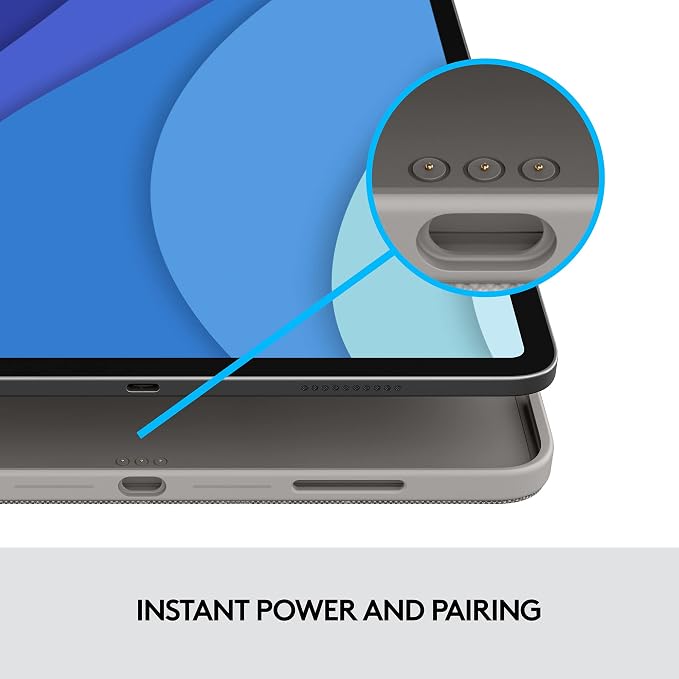
- SMART CONNECTOR technology: Enjoy instant power and pairing with Combo Touch keyboard case and never worry about charging as power is sourced directly from your iPad Pro
- Home for Apple Pencil: Easily charge your Apple Pencil while keeping the case on thanks to a convenient opening in the side of the iPad Pro case
- Apple iPad and Apple Pencil are NOT included and is sold separately.
| Compatible Devices | iPad Pro |
| Connectivity Technology | Powered by iPad via the Smart Connector |
| Additional Features | Backlit, Integrated Stand, Rechargeable, Trackpad |
| Keyboard Backlighting Color Support | Single Color |
| Power Source | Wired |
| Switch Type | Scissor-Switch |
| Keyboard Layout | QWERTY |
| Hand Orientation | Ambidextrous |
| Button Quantity | 78 |
| Mechanical Keyboard Switch Model | Scissor-Switch |
| Compatible Operating System Family | iPadOS |
| Compatible Tablet Computer Models | Apple iPad Pro 11-inch (1st generation), Apple iPad Pro 11-inch (2nd generation), Apple iPad Pro 11-inch (3rd generation) |
| Is Electric | Yes |
| Number of Keys | 78 |
| Color | Oxford Gray |
| Style Name | 1st, 2nd, 3rd & 4th gen |
| Theme | Productivity |
| Item Dimensions L x W x H | 9.92"L x 0.62"W x 7.45"H (25.2 x 1.6 x 18.9 cm) |
| Enclosure Material | Plastic |
| Brand | Logitech |
| Keyboard Description | Membrane |
| Antenna Location | Office |
| Built-In Media | Keyboard case (Apple iPad and Apple Pencil not included), User documentation |
| Model Number | 920-010095 |
| Model Name | Combo Touch |
| Global Trade Identification Number | 00097855166180 |
| Unit Count | 1.0 Count |
| Manufacturer | Logitech |
| UPC | 097855166180 |
| Mfr Part Number | 920-010095 |
| Item Type Name | Keyboard/Cover Case |
| External Testing Certification | Grau 1, Não aplicável |
| Generation | 4 |
| Recommended Uses For Product | Office |
| Special Feature | Backlit, Integrated Stand, Rechargeable, Trackpad |
| Keyboard backlighting color support | Single Color |
| Style | 1st, 2nd, 3rd & 4th gen |
| Product Dimensions (L x W x H) | 9.92"L x 0.62"W x 7.45"H (25.2 x 1.6 x 18.9 cm) |
| Package Weight | 4.34 Pound |
What's in the box
Keyboard case (Apple iPad and Apple Pencil not included)
User documentation
Who Should Buy?

-
Students
Perfect for students who need a reliable keyboard for taking notes and completing assignments on the go.
-
Professionals
Great for professionals who require a portable solution for typing emails and documents during travel or meetings.
-
Content Creators
Ideal for content creators looking for a versatile setup for writing, sketching, or editing with ease.

-
Casual Users
Not suitable for casual users who primarily use their iPad for browsing and do not require a keyboard.
-
Gamers
May not meet the needs of gamers seeking specialized keyboards for enhanced performance and responsiveness.
-
Budget Buyers
Not ideal for buyers on a tight budget, as it may be considered a premium-price accessory.
Product Description
Have any Query? Chat with us
Customer Questions & Answers
-
Question:
What is the Logitech Combo Touch iPad Pro Keyboard Case?
Answer: The Logitech Combo Touch is a versatile keyboard case designed for the iPad Pro 11-inch models, offering a detachable backlit keyboard and a click-anywhere trackpad. This product seamlessly combines protection and productivity, perfect for users looking to enhance their iPad experience. With a snug fit, the Case protects your device from scratches and falls while providing an optimal typing experience, making it ideal for students, professionals, and creatives who rely on their iPads for work, study, or leisure. -
Question:
How do I detach the keyboard from the Logitech Combo Touch?
Answer: Detaching the keyboard from the Logitech Combo Touch is a straightforward process. Simply lift the keyboard section away from the case; it is designed to easily snap on and off magnetically. This functionality allows you to use the iPad in a lightweight tablet mode or when presenting, making it convenient for varied environments, whether it's in a café, classroom, or boardroom setting. -
Question:
Does the Combo Touch support the Apple Pencil?
Answer: Yes, the Logitech Combo Touch is designed to accommodate and enhance the usage of the Apple Pencil. The iPad can be easily inserted into the case with the Pencil attached magnetically, ensuring you have your accessories ready whenever inspiration strikes. This feature is especially useful for artists and note-takers who prefer digital mediums for drawing or annotating directly on their iPad. -
Question:
Is the keyboard backlit, and is there an adjustable brightness feature?
Answer: Absolutely! The Logitech Combo Touch features a backlit keyboard with adjustable brightness levels, allowing you to customize the lighting to suit your environment. This is particularly beneficial when working in dimly lit spaces such as during a late-night study session or in a flight cabin. The backlit feature ensures that you can type comfortably, enhancing productivity regardless of the setting. -
Question:
What iPad Pro models are compatible with the Logitech Combo Touch?
Answer: The Logitech Combo Touch is compatible with the iPad Pro 11-inch 1st, 2nd, 3rd, and 4th generation models. This extensive compatibility makes it a flexible choice for users with different models who want a unified keyboard/case solution. It ensures that you can enjoy all the features of the Combo Touch, regardless of which iPad Pro version you own. -
Question:
Can I use the Combo Touch in different viewing angles?
Answer: Yes, the Logitech Combo Touch offers multiple viewing angles, enabling you to find the perfect position for typing, drawing, or watching videos. The adjustable kickstand allows users to select their desired angle, which is especially useful for presentations or when collaborating with teams in different settings, enhancing versatility and comfort in usage. -
Question:
How does the Click-Anywhere trackpad function?
Answer: The Click-Anywhere trackpad on the Logitech Combo Touch provides a smooth and intuitive navigation experience. It allows users to click anywhere on the trackpad surface for precise control, which is especially helpful for multitasking or when editing documents. This feature mimics the feel of a laptop, making it easier to work on extensive projects without needing an external mouse. -
Question:
What materials is the Logitech Combo Touch made of?
Answer: The Logitech Combo Touch is constructed with durable materials designed to provide protection and extend the lifespan of your iPad. The outer layer offers a robust shield against scratches and dents, while the interior is crafted for a snug fit. This quality ensures that your device remains secure during travel and day-to-day use, making it an excellent choice for everyday users and professionals alike. -
Question:
How does the battery for the keyboard get charged?
Answer: The keyboard of the Logitech Combo Touch does not require batteries or charging; it connects to the iPad via Smart Connector technology. This means that as soon as you attach the keyboard, it powers on automatically and draws energy directly from the iPad. This feature eliminates the need for external power sources, making it a hassle-free accessory that allows for uninterrupted use. -
Question:
Where can I buy the Logitech Combo Touch in Saint Lucia?
Answer: You can purchase the Logitech Combo Touch iPad Pro 11-inch Keyboard Case easily at Ubuy. They offer a wide selection of tech accessories along with various shipping options for customers in Saint Lucia. Ubuy's user-friendly website ensures that you can browse and find this high-quality product without any hassle.
Logitech Keyboard Cases 920-010095 Editorial Review


In the world of iPad Pro accessories, the Logitech Combo Touch Keyboard Case for the iPad Pro 11-inch (M4) stands out as a strong competitor to the Apple-branded options. One major highlight of this keyboard case is that it eschews batteries and Bluetooth connections, connecting instead the same way the Apple Magic Keyboard does, simplifying usage. The case is flexible, allowing you to detach the iPad from the keyboard part easily, and it magnetically reconnects, making it convenient and user-friendly. When it comes to functionality, users praise the responsive trackpad and keyboard that support gestures. One standout feature is that the touchpad requires a click to select something, which minimizes accidental touches while typing, enhancing the overall typing experience. However, there are some drawbacks to Consider. Users have noted that the stand is not very sturdy, making the iPad prone to tipping over with slight movement. Additionally, some users have reported issues with the trackpad randomly registering touches on the screen even without physical contact, which can be frustrating and impact productivity. Overall, the Logitech Combo Touch Keyboard Case offers a solid combination of features and functionality, making it a viable alternative to official Apple offerings. While there are some design flaws to be aware of, such as the stand's stability and trackpad issues, the keyboard's responsiveness and user-friendly elements make it a compelling option for iPad users. **
Customer Reviews & Ratings
2549 customers ratings
-
5 Star
72%
-
4 Star
13%
-
3 Star
7%
-
2 Star
2%
-
1 Star
6%
Review this product
Share your thoughts with other customers
Pros
- No need for batteries or Bluetooth connection
- Detachable case with magnetic reconnection
- Responsive trackpad and keyboard supporting gestures
- Touchpad requires a click to select, reducing accidental touches
Cons
- Stand lacks sturdiness, leading to potential tipping over
Product Price History
Important information
- Limitations : For products shipped internationally, please note that any manufacturer warranty may not be valid; manufacturer service options may not be available; product manuals, instructions, and safety warnings may not be in destination country languages; the products (and accompanying materials) may not be designed in accordance with destination country standards, specifications, and labeling requirements; and the products may not conform to destination country voltage and other electrical standards (requiring use of an adapter or converter if appropriate). The recipient is responsible for assuring that the product can be lawfully imported to the destination country. When ordering from Ubuy or its affiliates, the recipient is the importer of record and must comply with all laws and regulations of the destination country.
- Not all the products listed on Ubuy are for sale, as Ubuy is a global search engine. Products are subject to export/trade regulations.
XCD 658
Order now and get it around Tuesday, June 30
This item is not restrict in my country.(Please click on above link if this item is not restrict in your country, So our team will review and allow.)
QTY:
Secured transaction
Ubuy works hard to protect your security and privacy. Our advanced payment security system ensures confidentiality by encrypting your information during transmission using AES (Advanced Encryption Standards) and SSL (Secure Socket Layer) protocols. Your payment details are 100% secure as we do not share your payment details with third party sellers.
Our Top Logistics Partners
Fastest cross-border delivery
Features & Benefits
- Multiple use modes and infinite possibilities
- Flexible kickstand and detachable keyboard for total freedom
- Sturdy yet lightweight case for secure protection
- Dynamic smart tip adjusts line weight depending on angle
- Powered by Apple Pencil technology for precise writing and drawing
- Large Multi-Touch trackpad for familiar gesture controls