- Home Page /
- Office Products /
- Office Electronics /
- Other Office Equipment /
- Label Makers /
- iDPRT Label Maker, Thermal Barcode Printer wi...
0 ratings


Item #:
221986920
iDPRT Label Maker, Thermal Barcode Printer with No Bound Consumables, Bluetooth & USB Connection, 140pcs/min Speed, Customizable App, Supports
Item #:
221986920
XCD 266
Price Details
Excluding Shipping & Custom charges ( Shipping and custom charges will be calculated on checkout )
*All items will import from US
In stock
 Imported from USA store
QTY:
Order now and get it around Thursday, August 20
Secured transaction
Ubuy works hard to protect your security and privacy. Our advanced payment security system ensures confidentiality by encrypting your information during transmission using AES (Advanced Encryption Standards) and SSL (Secure Socket Layer) protocols. Your payment details are 100% secure as we do not share your payment details with third party sellers.
Our Top Logistics Partners


Embrace the cost-saving freedom of our label maker, which allows you to use affordable printer paper from any brand.

Fast
Shipping

Free
Return*

Secure Packaging

100% Original Products

PCI DSS Compliance

ISO 27001 Certified


Note: Step Down Voltage Transformer required for using electronics products of US store (110-120). Recommended power converters Buy Now.


What Stands Out
High Speed
Achieve rapid printing at 140 labels per minute, ensuring your small business maintains efficiency and productivity without the delay typically associated with label printing.
Versatile Connectivity
Easily connect via Bluetooth or USB, providing flexibility for various devices. This allows for seamless integration into your existing workflow, enhancing usability for all users.
Customizable App
Utilize the user-friendly app to design and customize labels, accommodating various sizes from 1” to 3.15”. This empowers businesses to create unique labels tailored to their specific needs.
Product Details
- [Cost-Saving Freedom: No Bound Consumables] Experience the cost-saving freedom of our label maker, which eliminates the need for bound consumables. This label maker allows you to use printer paper from any brand available on the website (for thermal paper of suitable size only). Say goodbye to expensive proprietary label paper and embrace the flexibility of choosing affordable options. With this label maker, you can save more.
- [Two Connection Options & Seamless Connectivity] Experience unparalleled convenience with our barcode printer's versatile connectivity options. Seamlessly connect via Bluetooth or USB and unleash the power of printing from any device. Effortlessly print directly from your phone using our intuitive app, designed for easy operation and maximum flexibility. Whether you're on the go or at your desk, our barcode printer enables you to complete your personal tasks with ease and efficiency.
- [Unmatched Speed & Efficiency] Experience unparalleled speed and efficiency with our address label printer, surpassing competitors in the race for fast label printing. With a fast printing speed of 140pcs/min, our address label printer excels in handling large-scale printing tasks with ease. Whether you're printing a batch of address labels or embarking on a mass labeling project, our address label printer delivers unmatched performance, ensuring you achieve your goals quickly and effortlessly.
- [Versatile Labeling] From address labels to barcodes, this barcode label printer supports various sized labels, enabling you to label file folders, storage boxes, and more. Provide a polished look to your packages with address labels, streamline your inventory management with barcode labels, or add a personal touch to gift tags and party favors. Whether you're in the workplace or home, our barcode label maker ensures professional labeling in every scenario.
- [Customizable Labels] Unleash your creativity and make your labels unique with our label printer for small business's complimentary editing tools("Herelabel" for macOS and Android, and "Label Designer" for PC). Customize your labels with different fonts, graphics, and layouts, all tailored to your preferences. Whether you're adding a personal touch or aligning with your brand, you can use our label printer for small business to print customized labels to stand out from the crowd and leave a lasting impression.
| Printer Type | Thermal |
| Other Special Features of the Product | Bluetooth for Phone (android, iOS), High-Speed 170mm/s Thermal Printing |
| Printer Output Type | Monochrome |
| Item Dimensions D x W x H | 8.11"D x 6.1"W x 5.28"H (20.6 x 15.5 x 13.4 cm) |
| Controller Type | Android |
| Print media | Labels |
| Scanner Type | No |
| Compatible Devices | Laptops, Smartphones |
| Ink Color | Black |
| Additional Printer Functions | Print Only |
| Control Method | App |
| Resolution | 203 x 203 DPI |
| B&W Pages per Minute | 140 pages_per_minute |
| Initial Page Print Time | 4.29 seconds |
| Color | Dark Black |
| Color Depth | 1 bits_per_pixel |
| Printer Connectivity Type | Bluetooth, USB |
| Hardware Interface | USB |
| Total Usb Ports | 1 |
| Brand | iDPRT |
| Model Name | SP320 |
| Model Number | SP320 Black |
| Built-In Media | 1 x CD or USB flash drive, 1 x Power Cord, SP320 Thermal Printer |
| Model Series | SP |
| Specific Uses For Product | [possible uses: beverage labels, food labels, office labels, commodity tags, shipping labels] |
| Unit Count | 1 Count |
| Manufacturer | Xiamen Hanin Co.,Ltd. |
| Maximum Media Size | 3.15 inches (8 cm) |
| Maximum Sheet Capacity | 50 |
| Paper Size | 1 - 3.15 inches (2.5 cm) |
| Maximum print Resolution Color | 203 dots_per_inch (515.6 cm) |
| Maximum Print Resolution Black and White | 203 dpi |
| Duplex | Automatic |
| Maximum Copy Resolution Color | 203 dpi |
| Maximum Copy Resolution Black and White | 203 DPI |
| Connectivity Technology | Bluetooth, USB |
| Printing Technology | Thermal |
| Special Feature | Bluetooth for Phone (android, iOS), High-Speed 170mm/s Thermal Printing |
| Printer Output | Monochrome |
| Max Printspeed Monochrome | 140 pages_per_minute |
| Product Dimensions (L x W x H) | 8.11"D x 6.1"W x 5.28"H (20.6 x 15.5 x 13.4 cm) |
What's in the box
SP320 Thermal Printer
1 x CD or USB flash drive
1 x Power Cord
Who Should Buy?

-
Small Business Owners
Ideal for small businesses needing efficient labeling for products and inventory management without additional ink costs.
-
E-commerce Sellers
Great for online sellers who require fast and customizable label printing for shipping and product identification.
-
Organizational Tasks
Perfect for individuals needing to organize files, storage, or home office items with customizable and varied-sized labels.

-
Heavy Industrial Use
Not suitable for environments requiring highly robust and industrial-grade label printers capable of extreme conditions.
Product Description
Have any Query? Chat with us
Customer Questions & Answers
-
Question:
What type of label sizes can the iDPRT Label Maker accommodate?
Answer: The iDPRT Label Maker is designed to work with a variety of label sizes, supporting both standard and customizable formats. This versatility makes it suitable for different applications, such as shipping labels, barcode labels, and product tags. For instance, whether you need small price tags for retail or larger shipping labels for packages, this printer can handle it all, allowing businesses to streamline their labeling processes. -
Question:
How does the Bluetooth connectivity work for the iDPRT Label Maker?
Answer: The Bluetooth connectivity feature allows you to wirelessly connect your devices, such as smartphones and tablets, to the iDPRT Label Maker. By using the customizable app provided with the printer, you can easily design and print labels directly from your device. This functionality is especially useful for on-the-go labeling or managing inventory without the hassle of tangled cords, making your workflow more efficient. -
Question:
Can I use the iDPRT Label Maker with a computer?
Answer: Yes, the iDPRT Label Maker supports both Bluetooth and USB connections, allowing you to connect and print from your computer seamlessly. This dual functionality enables you to use various software applications for label design and printing. It's ideal for users who prefer desktop planning, making it suitable for home offices, warehouses, or retail settings, where you can create more complex label layouts. -
Question:
What are the benefits of using thermal printing?
Answer: Thermal printing offers several advantages, such as fast printing speeds and high-quality output. The iDPRT Label Maker operates at 140 labels per minute, ensuring you can quickly produce large volumes of labels without sacrificing quality. Additionally, thermal printing eliminates the need for ink or toner, reducing ongoing consumable costs. This makes it a cost-effective and reliable solution for businesses needing frequent and consistent label production. -
Question:
Is the iDPRT Label Maker suitable for small businesses?
Answer: Absolutely! The iDPRT Label Maker is ideal for small businesses due to its multifunctionality, ease of use, and cost efficiency. The customizable app allows owners to create unique branding labels easily, while the Bluetooth and USB options provide flexibility in how labels are printed. Whether you run a boutique, an online shop, or manage a small inventory, this label maker can help elevate your business operations. -
Question:
Can I customize labels with the iDPRT Label Maker?
Answer: Yes, the iDPRT Label Maker allows for extensive customization of labels through its user-friendly app. You can adjust text, add logos, and incorporate various design elements according to your branding needs. This feature is particularly beneficial for businesses wanting to keep their labels cohesive and professional, allowing for quick adjustments as products or information change. -
Question:
What materials are compatible with the iDPRT Label Maker?
Answer: The iDPRT Label Maker is compatible with a range of thermal label materials, including paper and synthetic labels. This ensures that you can choose the right label material for different applications, whether for indoor product labeling or outdoor shipping requirements. Choosing the right material can impact durability, so think of where and how you’ll use your labels—the iDPRT Label Maker has you covered. -
Question:
What type of labels can I print for shipping?
Answer: The iDPRT Label Maker can produce various types of shipping labels, including plain and barcode labels, which are vital for tracking parcels in transit. It supports popular barcoding systems, making it ideal for e-commerce businesses that ship products. With its quick printing speed and flexible formats, managing your shipping needs becomes streamlined, ensuring packages are properly labeled for smooth delivery. -
Question:
Is the iDPRT Label Maker easy to set up?
Answer: Yes, the iDPRT Label Maker is designed with user convenience in mind. The setup process is straightforward; simply connect it via Bluetooth or USB to your device, install the app, and you're ready to go. This simplicity makes it accessible even for users who may not be tech-savvy, allowing for immediate productivity, whether in a workplace or personal project. -
Question:
Where can I buy the iDPRT Label Maker?
Answer: You can purchase the iDPRT Label Maker through Ubuy, which offers a comprehensive selection of products globally. Ubuy provides a user-friendly shopping experience, ensuring you find what you need quickly. The platform is reliable for browsing and buying this label maker, complete with the necessary resources to assist you in making an informed purchase.
iDPRT Label Makers SP320 Black Editorial Review


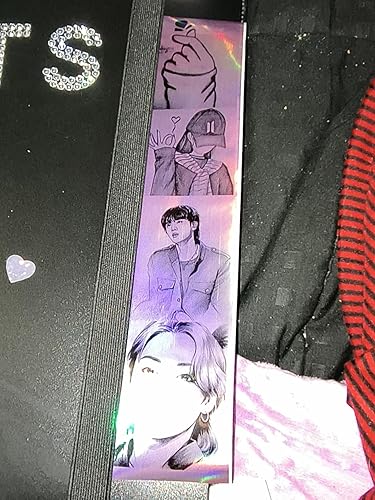


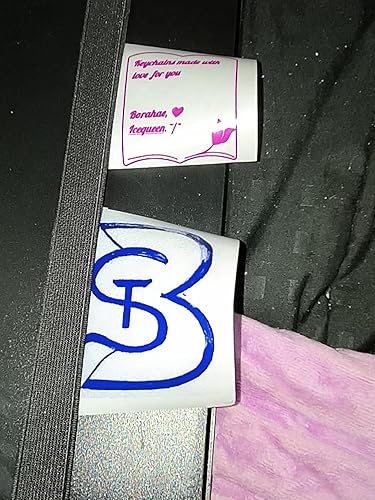

The customer experience with this label printer is generally positive, showcasing its versatility and efficiency for both personal and business use. Users appreciate the clear print quality and the ability to handle various printing papers without the need for special Consumables, a significant advantage in operations. Many found the setup straightforward, enhancing the overall user experience, whether for logistics in a warehouse or creative projects like making keychains for events. Connectivity options, including USB and Bluetooth, also received favorable feedback, with many users noting their reliability. The compact and portable design is another point of praise, allowing for easy transportation and convenient desk placement. The printer is described as quick and capable of Consistent use, presenting a robust choice for those requiring a dependable label printing solution. However, there are some downsides reported by customers. A recurring theme is the printer's lack of a charging cord, which some found inconvenient. Some users also experienced minor issues with the mechanical tearing mechanism for cutting labels, but this did not significantly impact their overall satisfaction. On the flip side, one user voiced Considerable frustration with the setup process, highlighting that it can be complicated for those not tech-savvy. In conclusion, the label printer stands out for its efficiency, portability, and print quality, making it an appealing option for a range of use cases, though potential buyers should be aware of setup complexities and mechanical quirks. ###
Customer Reviews & Ratings
184 customers ratings
-
5 Star
60%
-
4 Star
18%
-
3 Star
3%
-
2 Star
5%
-
1 Star
14%
Review this product
Share your thoughts with other customers
Pros
- High-quality, clear printing
- Versatile with various types of printing paper
- Simple and straightforward setup
- Reliable and stable connectivity (USB and Bluetooth)
- Compact and portable design
- Great for both personal and business use ###
Cons
- Does not include a charging cord
Platform Trust & Buyer Confidence

MA
Mohammad
Verified buyer
“Excellent quality and original too,when ubuy send original things I will appreciate that ,I very satisfied thank you”
23 July 2026 · via Trustpilot
CK
Chitra
Verified buyer
“The order and delivery progress was communicated very well. Package arrived within the estimated time. Products arrived as expected in good condition.”
22-Jul-26 · via Trustpilot
K
kund
Verified buyer
“Good supply of products. Safe payment methods, and shipment worldwide! Genuine products.”
23-Jul-26 · via Trustpilot
OO
Onesi
Verified buyer
“Was my first time buying a product from Ubuy, but I found it so helpful. This is reliable. Gonna place a new order!”
22 July 2026 · via Trustpilot
SJ
SAO JOHN
Verified buyer
“Ubuy is a great online platform to buy stuff. Reliable, fast delivery time and great value for money. I've been using Ubuy online shopping platform for three years now and will continue to do so.”
23 July 2026 · via Trustpilot
Secure Checkout
Global Delivery
Easy Returns
Genuine Products
Product Price History
Important information
- Limitations : For products shipped internationally, please note that any manufacturer warranty may not be valid; manufacturer service options may not be available; product manuals, instructions, and safety warnings may not be in destination country languages; the products (and accompanying materials) may not be designed in accordance with destination country standards, specifications, and labeling requirements; and the products may not conform to destination country voltage and other electrical standards (requiring use of an adapter or converter if appropriate). The recipient is responsible for assuring that the product can be lawfully imported to the destination country. When ordering from Ubuy or its affiliates, the recipient is the importer of record and must comply with all laws and regulations of the destination country.
- Not all the products listed on Ubuy are for sale, as Ubuy is a global search engine. Products are subject to export/trade regulations.
XCD 266
Order now and get it around Thursday, August 20
This item is not restrict in my country.(Please click on above link if this item is not restrict in your country, So our team will review and allow.)
QTY:
Secured transaction
PCI DSS compliant and ISO 27001:2022 certified, with encrypted payments and full buyer protection on every order.
Our Top Logistics Partners
Fastest cross-border delivery
Features & Benefits
- Eliminates the need for expensive proprietary label paper.
- Supports printer paper from any brand of suitable size.
- Connects seamlessly via Bluetooth or USB for maximum convenience.
- Offers a fast printing speed of 140 pcs/min for efficiency.
- Versatile support for various label sizes and types.
- Includes customizable labels with user-friendly editing tools.
Ubuy Assurance
Experience worry-free shopping with 100% original products, PCI DSS-compliant payment security, ISO 27001-certified data protection, the fastest cross-border delivery, free returns *, and secure packaging on every order.