0 ratings

Item #:
89328205
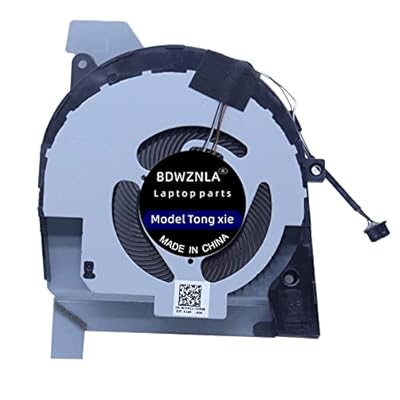
Replacement New Integrated Graphics CPU Cooling Fan for DELL Latitude 5501 5511 Precision 3541 3551 P80F Series 0CVMC1 DFS20004053J0T FLAN
Item #:
89328205
XCD 59
Price Details
Excluding Shipping & Custom charges ( Shipping and custom charges will be calculated on checkout )
*All items will import from US
0 ratings
Write a review
In stock
 Imported from USA store
QTY:
Order now and get it around Thursday, July 23
Secured transaction
Ubuy works hard to protect your security and privacy. Our advanced payment security system ensures confidentiality by encrypting your information during transmission using AES (Advanced Encryption Standards) and SSL (Secure Socket Layer) protocols. Your payment details are 100% secure as we do not share your payment details with third party sellers.
Our Top Logistics Partners


Replacement New Integrated Graphics CPU Cooling Fan for DELL Latitude and Precision series.

Fast
Shipping

Free
Return*

Secure Packaging

100% Original Products

PCI DSS Compliance

ISO 27001 Certified


Note: Step Down Voltage Transformer required for using electronics products of US store (110-120). Recommended power converters Buy Now.


What Stands Out
Direct Compatibility
Designed specifically for DELL Latitude 5501, 5511, and Precision 3541, 3551 models, ensuring seamless installation and operational reliability without modifications.
Efficient Cooling
Integrates advanced cooling technology to optimize CPU performance, preventing overheating during intensive tasks and extending laptop lifespan.
Durable Construction
Features robust materials and engineering for long-lasting performance, providing peace of mind and value by reducing the need for frequent replacements.
Product Details
| Item Weight | 0.5 lbs (230 grams) |
Who Should Buy?

-
Dell Laptop Users
Ideal for users with Dell Latitude 5501/5511 or Precision 3541/3551 needing a reliable cooling solution.
-
Gamers and Designers
Perfect for resource-intensive tasks where overheating can affect performance and fan replacement is essential.
-
DIY Repair Enthusiasts
Excellent choice for users comfortable with hardware repairs and looking to extend the life of their laptop.

-
Non-Dell Device Owners
Not suitable for users with laptops from brands other than Dell, as compatibility may be an issue.
-
Casual Users
Less beneficial for users who use laptops for simple tasks and not resource-heavy applications that require cooling.
-
Warranty Concerned Buyers
May void warranty for users relying on manufacturer services, as it involves third-party replacement parts.
Product Description
Replacement New Integrated Graphics CPU Cooling Fan for DELL Latitude 5501 5511 Precision 3541 3551 P80F Series 0CVMC1 DFS20004053J0T FLAN EG50060S1-C440-S9A DC28000NXSL DC28000NXFL Fan
Have any Query? Chat with us
Customer Questions & Answers
-
Question:
What is the purpose of the Replacement New Integrated Graphics CPU Cooling Fan?
Answer: The Replacement New Integrated Graphics CPU Cooling Fan is designed to dissipate heat from the CPU and integrated graphics in DELL Latitude 5501, 5511, and Precision 3541, 3551 series laptops. By maintaining optimal temperatures, it prevents overheating, which can lead to thermal throttling and performance degradation. This fan is crucial for ensuring your laptop operates efficiently, especially during demanding tasks such as gaming or video editing. -
Question:
How do I install the Replacement Cooling Fan in my DELL laptop?
Answer: Installing the Replacement Cooling Fan involves several steps: first, power down your laptop and remove the battery if possible. Then, disassemble the laptop casing carefully to access the internal components. Locate the existing cooling fan, disconnect it, and remove it from the housing. Place the new fan in its position, connect the wiring properly, and reassemble your laptop. Following manufacturer guides or video tutorials can help streamline this process. -
Question:
Is this cooling fan compatible with other DELL models?
Answer: This specific cooling fan is primarily designed for DELL Latitude 5501, 5511, and Precision 3541, 3551 series laptops. While it may fit other models, compatibility cannot be guaranteed without checking the part number and specifications. Always refer to DELL’s compatibility lists or consult support if unsure. Using the correct fan ensures better cooling efficiency and prevents potential mechanical issues. -
Question:
What are the potential signs of a failing cooling fan?
Answer: Common signs of a failing cooling fan include excessive heat buildup, unusual noises such as grinding or rattling, and frequent system shutdowns due to overheating. If your laptop's performance drops, especially during high-demand tasks, or if it becomes uncomfortably hot to touch, it may be time to replace the cooling fan. Regularly monitoring the operating temperature using software tools can also help identify fan issues early. -
Question:
Can I clean the existing cooling fan instead of replacing it?
Answer: Cleaning the existing cooling fan can be a temporary fix, particularly if dust buildup is the issue. Use compressed air to blow out dust from the fan blades and vents, ensuring you hold the fan in place to prevent damage. However, if your fan is failing or making noise, replacement is often the more reliable solution for long-term performance. Regular cleaning of your laptop's cooling system helps maintain optimal airflow and cooling efficiency. -
Question:
What materials is the cooling fan made of?
Answer: The Replacement New Integrated Graphics CPU Cooling Fan is typically constructed from high-quality plastic and metal components. The fan blades are designed for durability and efficient airflow, while the motor ensures reliable operation. This construction allows the fan to withstand the rigors of continuous use while providing effective cooling performance. Ensuring your laptop utilizes high-quality parts promotes longevity and efficient thermal management. -
Question:
How much noise does the cooling fan generate during operation?
Answer: The noise level generated by the cooling fan is generally minimal, as it is designed to operate quietly while effectively cooling your laptop. Most users report that the fan is noticeably quieter than previous models, ensuring a distraction-free experience during use. However, excessive noise may indicate an issue, such as dirt accumulation or mechanical failure, necessitating immediate attention for optimal performance. -
Question:
Are there any risks associated with installing the cooling fan myself?
Answer: While many users successfully install the cooling fan themselves, there are risks involved, such as damaging internal components or voiding any existing support agreements. It’s important to handle all parts carefully, follow manufacturer instructions, and ensure static precautions are taken during installation. If you are uncertain or inexperienced, hiring a professional technician for this installation may provide peace of mind and safeguard against potential mishaps. -
Question:
What should I do if my fan replacement does not resolve overheating issues?
Answer: If replacing the cooling fan does not solve your overheating problems, it may indicate an underlying issue, such as thermal paste degradation on the CPU or improper heat sink attachment. Inspect other cooling components and ensure vents are not obstructed. Additionally, monitoring the workload on your CPU can help identify if upgrades or optimizations are needed. Consulting with a professional technician can provide further diagnostic insights. -
Question:
Where can I buy the Replacement New Integrated Graphics CPU Cooling Fan for DELL models?
Answer: You can purchase the Replacement New Integrated Graphics CPU Cooling Fan for DELL Latitude 5501, 5511, Precision 3541, 3551 models from Ubuy. This platform offers a wide selection of quality parts and accessories, ensuring you find the right component for your laptop. Simply visit the Ubuy website, search for the product, and proceed with your order to enhance your laptop’s cooling efficiency.
BDWZNLA CPU Cooling Fans Editorial Review
No editorial reviews found
Customer Reviews & Ratings
1 customers ratings
-
5 Star
100%
-
4 Star
0%
-
3 Star
0%
-
2 Star
0%
-
1 Star
0%
Review this product
Share your thoughts with other customers
Platform Trust & Buyer Confidence

MT
Mohd
Verified buyer
“The product received very good packaging & safe…Thank You”
16 June 2026 · via Trustpilot
SJ
Shawati
Verified buyer
“Accurate delivery timing given”
16 June 2026 · via Trustpilot
YB
Youcef
Verified buyer
“Not madly expensive like I thought, and much quicker than promised.”
15 June 2026 · via Trustpilot
LM
Leila
Verified buyer
“Never dealt with Ubuy before, but everything worked out great. Seamless cross border purchasing and shipping. Thanks!”
6/7/2026 · via Trustpilot
KA
Kwame
Verified buyer
“The process was smooth, with clear communication and timelines. This was my 1st purchase and I am really impressed. I will definitely be coming back.”
12 June 2026 · via Trustpilot
Secure Checkout
Global Delivery
Easy Returns
Genuine Products
Product Price History
Important information
- Limitations : For products shipped internationally, please note that any manufacturer warranty may not be valid; manufacturer service options may not be available; product manuals, instructions, and safety warnings may not be in destination country languages; the products (and accompanying materials) may not be designed in accordance with destination country standards, specifications, and labeling requirements; and the products may not conform to destination country voltage and other electrical standards (requiring use of an adapter or converter if appropriate). The recipient is responsible for assuring that the product can be lawfully imported to the destination country. When ordering from Ubuy or its affiliates, the recipient is the importer of record and must comply with all laws and regulations of the destination country.
- Not all the products listed on Ubuy are for sale, as Ubuy is a global search engine. Products are subject to export/trade regulations.
XCD 59
Order now and get it around Thursday, July 23
This item is not restrict in my country.(Please click on above link if this item is not restrict in your country, So our team will review and allow.)
QTY:
Secured transaction
PCI DSS compliant and ISO 27001:2022 certified, with encrypted payments and full buyer protection on every order.
Our Top Logistics Partners
Fastest cross-border delivery
Features & Benefits
- High-quality replacement for Dell Latitude 5501, 5511 and Precision 3541, 3551 series.
- Compatible with multiple fan models including 0CVMC1 and DFS20004053J0T.
- Essential for maintaining optimal CPU cooling performance.
- Easy to install for a quick fan upgrade.
- Designed to enhance the lifespan of your laptop.
- Reliable performance for a smoother computing experience.
Ubuy Assurance
Experience worry-free shopping with 100% original products, PCI DSS-compliant payment security, ISO 27001-certified data protection, the fastest cross-border delivery, free returns *, and secure packaging on every order.