- Home Page /
- Industrial Supplies /
- Test, Measure & Inspect /
- Network & Cable Testers /
- Fluke Networks OptiFiber Pro QUAD OTDR for Fiber Troubl...
0 ratings

Item #:
28121017
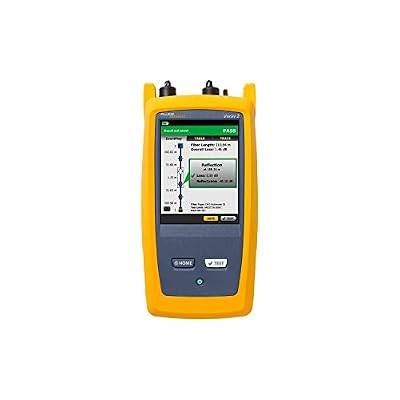
Fluke Networks OptiFiber Pro QUAD OTDR for Fiber Troubleshooting, V2, with WiFi
Item #:
28121017
XCD 56103
Price Details
Excluding Shipping & Custom charges ( Shipping and custom charges will be calculated on checkout )
*All items will import from US
0 ratings
Write a review
In stock
 Imported from USA store
QTY:
Order now and get it around Sunday, July 12
Secured transaction
Ubuy works hard to protect your security and privacy. Our advanced payment security system ensures confidentiality by encrypting your information during transmission using AES (Advanced Encryption Standards) and SSL (Secure Socket Layer) protocols. Your payment details are 100% secure as we do not share your payment details with third party sellers.
Our Top Logistics Partners


Fluke Networks' OptiFiber Pro Series OTDRs are powerful tools that enhance productivity for both beginners and experts.

Fast
Shipping

Free
Return*

Secure Packaging

100% Original Products

PCI DSS Compliance

ISO 27001 Certified


Note: Step Down Voltage Transformer required for using electronics products of US store (110-120). Recommended power converters Buy Now.


What Stands Out
Comprehensive Testing
The Fluke Networks OptiFiber & CertiFiber Pro QUAD offers robust OTDR and OLTS capabilities, ensuring thorough fiber optics certification and troubleshooting, addressing all potential user issues effectively in one tool.
WiFi Connectivity
Equipped with WiFi, this device allows for seamless data sharing and remote monitoring, significantly enhancing user convenience and productivity during fiber optic assessments compared to traditional models.
Inspection Capability
Integrated inspection functionality streamlines the inspection process, enabling users to identify and resolve issues swiftly, improving overall efficiency, and ensuring high-quality fiber installations and certifications.
Product Details
| Item Weight | 2 lbs (910 grams) |
Who Should Buy?

-
Network Technicians
Ideal for network technicians needing efficient certification and troubleshooting of fiber optic network installations.
-
Telecom Engineers
Great for telecom engineers who require advanced diagnostic tools for fiber optic transmission performance assessment.
-
Quality Assurance
Suitable for quality assurance teams requiring reliable verification of fiber optic installations and maintenance checks.

-
Casual Users
Not suitable for casual users lacking expertise in fiber optics or advanced network testing procedures.
-
Small Businesses
Small businesses might find this high-end equipment cost-prohibitive and unnecessary for their basic networking needs.
-
Software Developers
Software developers focused on application development will find fiber optic testing equipment irrelevant to their work.
Product Description
Fluke Networks OptiFiber Pro QUAD OTDR for Fiber Troubleshooting, V2, with WiFi
About This Item
Introducing the Fluke Networks OptiFiber Pro QUAD OTDR for Fiber Troubleshooting, V2, with WiFi & Inspection. This advanced fiber testing equipment is designed to make troubleshooting fiber networks faster and more efficient. Whether you are a novice or an expert, this product will help you get the job done with ease. The OptiFiber Pro Series OTDRs by Fluke Networks are equipped with automated trace analysis and setup features to support various applications, including data centers, PON, and outside plant.
With its user-friendly interface, you can quickly analyze and interpret OTDR traces, saving you time and effort. One of the key features of this product is the Manual Expert mode which allows for more detailed trace analysis. You can zoom in and pinch on specific sections of the trace to examine it closely, ensuring accurate troubleshooting and diagnosis. Another innovative feature is the SmartLoop function, which enables bi-directional testing without the need for manual fiber flipping. This saves you valuable time during testing and eliminates errors that can occur with manual flipping. The OptiFiber Pro supports Versiv copper and fiber loss certification modules, making it a versatile tool for all your testing needs.
Whether you are testing fiber optic cables, network cables, or performing OTDR testing, this product has you covered. Not only does this OptiFiber Pro deliver exceptional performance, but it also comes equipped with WiFi connectivity, allowing you to easily share and transfer test results to your preferred devices. Additionally, this model includes an integrated inspection function to ensure the quality of your fiber connections. Investing in the Fluke Networks OptiFiber Pro QUAD OTDR is like having a complete fiber optic troubleshooting toolkit at your fingertips. With its comprehensive range of features, this product will streamline your testing process, improve accuracy, and boost overall productivity. Choose the OptiFiber Pro for reliable fiber optic testing, troubleshooting, and certification.
Experience faster and more efficient fiber network troubleshooting with Fluke Networks.
Have any Query? Chat with us
Customer Questions & Answers
-
Question:
What is the Fluke Networks OptiFiber Pro QUAD OTDR used for?
Answer: The Fluke Networks OptiFiber Pro QUAD OTDR is designed for efficient fiber optic network troubleshooting and maintenance. It offers advanced capabilities to test and analyze fiber links, helping technicians isolate faults, perform characterization, and ensure optimal performance. This model is particularly useful for telecommunications services, data centers, and any environment where fiber optics are critical. With its intuitive interface, professionals can quickly assess fiber health and identify issues such as breaks or excessive loss, enhancing network reliability and reducing downtime. -
Question:
How does the WiFi feature enhance the functionality of the OptiFiber Pro QUAD OTDR?
Answer: The WiFi feature in the OptiFiber Pro QUAD OTDR enables seamless data transfer and remote monitoring capabilities. This enhances the technician's workflow by allowing them to view test results and perform analysis directly from mobile devices or computers without physical connections. This functionality is particularly advantageous in large installations, where technicians can move freely while accessing real-time data. It streamlines reporting and documentation processes, enabling a more efficient approach to network management. -
Question:
Can the OptiFiber Pro QUAD OTDR perform automated testing?
Answer: Yes, the OptiFiber Pro QUAD OTDR supports automated testing, which significantly enhances productivity. With features like automated setup and testing modes, technicians can run multiple tests with minimal manual intervention. This not only saves time during fiber installations but also ensures consistent results across tests. Such features are essential for large-scale projects where numerous fibers need testing, allowing teams to focus on analysis and problem resolution rather than repetitive tasks. -
Question:
What kind of display does the OptiFiber Pro QUAD OTDR have?
Answer: The OptiFiber Pro QUAD OTDR features a high-resolution touch screen display, offering clear visibility of test results and settings. This user-friendly interface allows technicians to easily navigate through options and view detailed graphical representations of testing data. The clarity and responsiveness of the display facilitate quick assessments during fieldwork, making it easier to interpret results and make informed decisions. This is particularly useful in environments with varying light conditions, ensuring usability under all circumstances. -
Question:
Is training required to operate the OptiFiber Pro QUAD OTDR effectively?
Answer: While previous experience with fiber optics can be helpful, the OptiFiber Pro QUAD OTDR is designed for user-friendliness, which minimizes the learning curve. Users can quickly learn how to navigate its features via the intuitive interface and comprehensive manuals. However, additional training or certification can enhance efficiency, especially for advanced functionalities like troubleshooting complex networks. Many professionals find that specialized training helps them leverage the OTDR's full potential, leading to better maintenance practices and network reliability. -
Question:
Does the OptiFiber Pro QUAD OTDR offer fiber characterization features?
Answer: Absolutely, the OptiFiber Pro QUAD OTDR provides advanced fiber characterization features, enabling technicians to analyze various parameters vital for network performance. It measures metrics such as attenuation, distance, and splice loss, providing a complete picture of fiber health. This level of analysis is crucial for ensuring that networks meet specific performance standards, especially in high-capacity environments like data centers and enterprise networks. Characterization helps identify subpar sections before they affect overall network reliability. -
Question:
What types of optical fibers can be tested with this OTDR?
Answer: The Fluke Networks OptiFiber Pro QUAD OTDR is equipped to test both single-mode and multimode optical fibers. This versatility allows technicians in various settings, from telecommunications to commercial buildings, to utilize a single tool for all types of fiber networks. Whether working on short multimode links for internal communications or lengthy single-mode fibers for long-haul telecommunications, this OTDR offers the functionality needed to ensure proper operation and performance across multiple projects. -
Question:
Can multiple tests be saved and analyzed later on the OptiFiber Pro QUAD OTDR?
Answer: Yes, the OptiFiber Pro QUAD OTDR allows users to store multiple test results for later analysis, making it a valuable tool for ongoing network diagnostics. Technicians can revisit and compare past tests to monitor changes in fiber performance over time, which is essential for proactive maintenance. This feature is particularly beneficial in environments where network conditions can change, as it enables a historical analysis to identify issues before they escalate. -
Question:
What accessories or additional tools are recommended for use with the OptiFiber Pro QUAD OTDR?
Answer: To maximize the effectiveness of the OptiFiber Pro QUAD OTDR, various accessories can be beneficial, including optical patch cords, cleaning kits, and protective cases. High-quality patch cords ensure accurate testing results, while cleaning kits help maintain the integrity of fiber connections. Additionally, a protective case can safeguard the OTDR during transport and field use. Using these accessories creates a comprehensive toolkit that enhances the testing and maintenance process. -
Question:
Where can I buy the Fluke Networks OptiFiber Pro QUAD OTDR for Fiber Troubleshooting, V2, with WiFi?
Answer: You can purchase the Fluke Networks OptiFiber Pro QUAD OTDR for Fiber Troubleshooting, V2, with WiFi from Ubuy. They offer a reliable platform for obtaining high-quality optical testing equipment, ensuring you have access to the latest technology and support. Ubuy provides a user-friendly interface, various payment options, and services tailored to enhance your shopping experience, making it an excellent choice for your OTDR purchase in Saint Lucia.
FlukeNetworks Network & Cable Testers Editorial Review
No editorial reviews found
Customer Reviews & Ratings
1 customers ratings
-
5 Star
100%
-
4 Star
0%
-
3 Star
0%
-
2 Star
0%
-
1 Star
0%
Review this product
Share your thoughts with other customers
Product Price History
Important information
- Limitations : For products shipped internationally, please note that any manufacturer warranty may not be valid; manufacturer service options may not be available; product manuals, instructions, and safety warnings may not be in destination country languages; the products (and accompanying materials) may not be designed in accordance with destination country standards, specifications, and labeling requirements; and the products may not conform to destination country voltage and other electrical standards (requiring use of an adapter or converter if appropriate). The recipient is responsible for assuring that the product can be lawfully imported to the destination country. When ordering from Ubuy or its affiliates, the recipient is the importer of record and must comply with all laws and regulations of the destination country.
- Not all the products listed on Ubuy are for sale, as Ubuy is a global search engine. Products are subject to export/trade regulations.
XCD 56103
Order now and get it around Sunday, July 12
This item is not restrict in my country.(Please click on above link if this item is not restrict in your country, So our team will review and allow.)
QTY:
Secured transaction
Ubuy works hard to protect your security and privacy. Our advanced payment security system ensures confidentiality by encrypting your information during transmission using AES (Advanced Encryption Standards) and SSL (Secure Socket Layer) protocols. Your payment details are 100% secure as we do not share your payment details with third party sellers.
Our Top Logistics Partners
Fastest cross-border delivery