0 ratings

Item #:
34800995
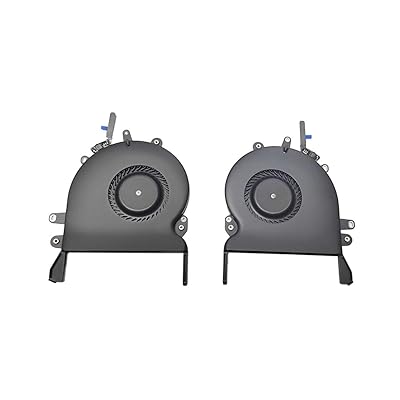
New A1990 A1707 CPU Cooling Fan Replacment 923-01471 Compatible for MacBook Pro Retina 15 A1707 A1990 Fan Left Right 2016 2017 2018 Year
Item #:
34800995
XCD 58
Price Details
Excluding Shipping & Custom charges ( Shipping and custom charges will be calculated on checkout )
*All items will import from US
0 ratings
Write a review
In stock
 Imported from USA store
QTY:
Order now and get it around Wednesday, July 15
Secured transaction
Ubuy works hard to protect your security and privacy. Our advanced payment security system ensures confidentiality by encrypting your information during transmission using AES (Advanced Encryption Standards) and SSL (Secure Socket Layer) protocols. Your payment details are 100% secure as we do not share your payment details with third party sellers.
Our Top Logistics Partners


Fast
Shipping

Free
Return*

Secure Packaging

100% Original Products

PCI DSS Compliance

ISO 27001 Certified


Note: Step Down Voltage Transformer required for using electronics products of US store (110-120). Recommended power converters Buy Now.


What Stands Out
Compatibility
Designed specifically for MacBook Pro Retina 15'' models A1707 and A1990, ensuring perfect fit and functionality for smooth operation.
Dual Fan Design
Includes both left and right cooling fans, providing optimal airflow and temperature regulation to prevent overheating during intensive tasks.
High Quality
Manufactured with premium materials for durability and performance, this replacement fan maintains the high standards of original Apple components.
Product Details
| Item Weight | 0.5 lbs (230 grams) |
Who Should Buy?

-
MacBook Owners
Users of MacBook Pro Retina 15'' models needing a cooling fan replacement for optimal performance.
-
DIY Repair Enthusiasts
Tech-savvy individuals who prefer self-repair and want to save on service costs by replacing the fan themselves.
-
Gaming Users
Gamers using MacBook Pro models who require efficient cooling to prevent overheating during intense gaming sessions.

-
Non-Tech Users
Individuals without technical skills may struggle with installation and should seek professional assistance instead.
-
Older Models
Users with MacBook models outside the specified 2016-2018 range will find this product incompatible with their devices.
-
Budget Shoppers
Customers looking for the cheapest options may find better value elsewhere if performance isn't a priority.
Product Description
New A1990 A1707 CPU Cooling Fan Replacment 923-01471 Compatible for MacBook Pro Retina 15 A1707 A1990 Fan Left Right 2016 2017 2018 Year
About This Item
Are you experiencing overheating issues with your MacBook Pro Retina 15'' A1707 or A1990? Look no further, because we have the perfect solution for you. Introducing the ICTION New A1990 A1707 CPU Cooling Fan Replacement. This high-quality cooling fan is specifically designed to fit the A1707 and A1990 models of the MacBook Pro Retina 15''. With its compatibility and exceptional performance, it is the ideal replacement for your current cooling fan.
Rest assured that this product is 100% new and in perfect working condition. We take pride in ensuring that our customers receive only the best quality products. Additionally, we offer a 6-month warranty, giving you peace of mind and confidence in your purchase. Installing this cooling fan is hassle-free and does not require any technical expertise.
Simply remove the old fan and replace it with this brand new one. You'll be able to enjoy a cooler and more efficient MacBook Pro in no time. With its left and right fan components, this replacement cooling fan ensures maximum airflow, effectively dissipating heat and preventing your MacBook from overheating. It is specifically designed to keep your MacBook Pro running at optimal temperature levels, even during intensive tasks or extended usage periods. Don't compromise the performance and longevity of your MacBook Pro.
Invest in the ICTION New A1990 A1707 CPU Cooling Fan Replacement today and say goodbye to overheating issues. Trust us, your MacBook Pro will thank you for it! Keywords: A1707 fan, A1990 fan, MacBook Pro cooling fan, replacement cooling fan, 923-01471, compatible fan, CPU cooling fan.
Have any Query? Chat with us
Customer Questions & Answers
-
Question:
What is the compatibility of the ICTION CPU Cooling Fan 923-01471?
Answer: The ICTION CPU Cooling Fan 923-01471 is specifically designed for the MacBook Pro Retina 15'' A1707 models from 2016 and 2017. This means it fits perfectly within the CPU cooling requirements of these MacBook models, ensuring optimal performance. Using a compatible cooling fan is essential, as it prevents overheating and enhances the overall efficiency of your laptop. If you're experiencing performance dips or excessive heat, replacing your fan with the ICTION model can be an excellent solution. -
Question:
How do I know if I need to replace my laptop's cooling fan?
Answer: Signs that indicate a cooling fan replacement may be necessary include your MacBook overheating, unusual noises coming from the fan, or system crashes due to thermal throttling. Additionally, if your laptop runs slow even with minimal tasks, it's a hint that your cooling system may not be functioning optimally. When you notice these symptoms, it's wise to consider replacing your cooling fan with the ICTION model to restore efficiency and prevent damage to your internal components. -
Question:
Can I install the ICTION fan myself?
Answer: Yes, the ICTION fan can be installed by users who are familiar with laptop repairs, but it does require some technical skill and the right tools. It involves removing the back cover of your MacBook, disconnecting the old fan, and connecting the new one. If you're confident in your ability to follow repair guides or tutorials, you can certainly perform the installation yourself. However, if you're uncertain, it may be beneficial to seek professional help to avoid any potential damage during the installation process. -
Question:
What are the benefits of replacing a faulty cooling fan?
Answer: Replacing a faulty cooling fan can dramatically impact your MacBook's performance and longevity. A new fan will improve air circulation, prevent overheating, and reduce the risk of hardware damage associated with excessive heat. This can result in smoother operation during demanding tasks like gaming or video editing. Additionally, a well-functioning cooling fan can help maintain the battery life of your device by reducing thermal strain, ultimately leading to a better user experience. -
Question:
Is the ICTION cooling fan noisy?
Answer: The ICTION cooling fan is designed for optimal performance with minimal noise. While all cooling fans may produce some sound while operating, this replacement fan aims to function quietly, ensuring that it does not disrupt your workflow or multimedia experiences. A quieter cooling solution is especially beneficial during video calls or when you're working on presentations, allowing for a more pleasant environment without distracting background noise. -
Question:
What tools do I need to replace the cooling fan?
Answer: To replace the ICTION cooling fan, you will typically need a P5 Pentalobe screwdriver, a T5 Torx screwdriver, and a plastic spudger. These tools allow you to safely access the internal components of your MacBook. Having the right tools not only simplifies the installation process but also helps prevent damage to the device. If it's your first time, consider watching a video tutorial to better understand the process and ensure a successful installation. -
Question:
Where can I buy the ICTION New Replacement CPU Cooling Fan 923-01471?
Answer: You can purchase the ICTION New Replacement CPU Cooling Fan 923-01471 on Ubuy. Ubuy offers a user-friendly shopping experience, along with a wide range of products. When looking for specific replacement parts such as this cooling fan, Ubuy ensures product authenticity and delivers convenience for online shopping. Just visit their website and search for the product to find it quickly. -
Question:
What should I do if my laptop still overheat after replacing the fan?
Answer: If your laptop continues to overheat even after installing the ICTION cooling fan, it may indicate another underlying issue, such as dusty vents, thermal paste degradation, or problems with other internal components. It's essential to clean the laptop’s vents and check for obstructions that may hinder airflow. If the problem persists, further diagnosis may be needed to evaluate additional factors like CPU or GPU overheating, which could require professional assistance. -
Question:
Can the ICTION fan help improve battery life?
Answer: Yes, the ICTION cooling fan can help improve battery life indirectly by keeping your MacBook's internal temperature in check. Overheating can lead to decreased performance and accelerate battery drain due to thermal throttling. By ensuring that your system stays cool and operates efficiently, the new fan can help maintain optimal performance levels, which contributes to better battery management and longevity in your device's life. -
Question:
How long does it take to replace the cooling fan?
Answer: Replacing the cooling fan with the ICTION model typically takes between 30 minutes to an hour, depending on your skill level and familiarity with laptop repairs. If you're experienced, the process may be quicker. It's important to allocate enough time to do the job correctly without rushing. Take the time to follow instructions carefully, use the proper tools, and ensure everything is reassembled correctly to prevent any issues later.
ICTION CPU Cooling Fans Editorial Review
No editorial reviews found
Customer Reviews & Ratings
1 customers ratings
-
5 Star
100%
-
4 Star
0%
-
3 Star
0%
-
2 Star
0%
-
1 Star
0%
Review this product
Share your thoughts with other customers
Platform Trust & Buyer Confidence

MT
Mohd
Verified buyer
“The product received very good packaging & safe…Thank You”
16 June 2026 · via Trustpilot
SJ
Shawati
Verified buyer
“Accurate delivery timing given”
16 June 2026 · via Trustpilot
YB
Youcef
Verified buyer
“Not madly expensive like I thought, and much quicker than promised.”
15 June 2026 · via Trustpilot
LM
Leila
Verified buyer
“Never dealt with Ubuy before, but everything worked out great. Seamless cross border purchasing and shipping. Thanks!”
6/7/2026 · via Trustpilot
KA
Kwame
Verified buyer
“The process was smooth, with clear communication and timelines. This was my 1st purchase and I am really impressed. I will definitely be coming back.”
12 June 2026 · via Trustpilot
Secure Checkout
Global Delivery
Easy Returns
Genuine Products
Product Price History
Important information
- Limitations : For products shipped internationally, please note that any manufacturer warranty may not be valid; manufacturer service options may not be available; product manuals, instructions, and safety warnings may not be in destination country languages; the products (and accompanying materials) may not be designed in accordance with destination country standards, specifications, and labeling requirements; and the products may not conform to destination country voltage and other electrical standards (requiring use of an adapter or converter if appropriate). The recipient is responsible for assuring that the product can be lawfully imported to the destination country. When ordering from Ubuy or its affiliates, the recipient is the importer of record and must comply with all laws and regulations of the destination country.
- Not all the products listed on Ubuy are for sale, as Ubuy is a global search engine. Products are subject to export/trade regulations.
XCD 58
Order now and get it around Wednesday, July 15
This item is not restrict in my country.(Please click on above link if this item is not restrict in your country, So our team will review and allow.)
QTY:
Secured transaction
Ubuy works hard to protect your security and privacy. Our advanced payment security system ensures confidentiality by encrypting your information during transmission using AES (Advanced Encryption Standards) and SSL (Secure Socket Layer) protocols. Your payment details are 100% secure as we do not share your payment details with third party sellers.
Our Top Logistics Partners
Fastest cross-border delivery