0 ratings

Item #:
20666028
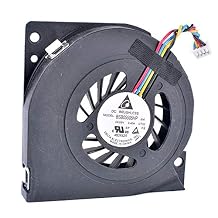
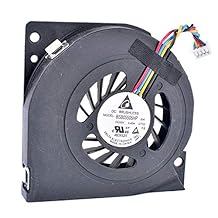
5V 0.4A 4Pin CPU Fan, 5.5cm Connector, Server Blower, Compatible with Lenovo A4980, B300, B305, BSB05505HP
86% of respondents would recommend this to a friend
Item #:
20666028
XCD 47
Price Details
Excluding Shipping & Custom charges ( Shipping and custom charges will be calculated on checkout )
*All items will import from US
0 ratings
Write a review
In stock
 Imported from USA store
QTY:
Order now and get it around Wednesday, September 30
Secured transaction
Ubuy works hard to protect your security and privacy. Our advanced payment security system ensures confidentiality by encrypting your information during transmission using AES (Advanced Encryption Standards) and SSL (Secure Socket Layer) protocols. Your payment details are 100% secure as we do not share your payment details with third party sellers.
Our Top Logistics Partners


High quality 4pin CPU fan compatible with LENOVO A4980

Fast
Shipping

Free
Return*

Secure Packaging

100% Original Products

PCI DSS Compliance

ISO 27001 Certified



Note: Step Down Voltage Transformer required for using electronics products of US store (110-120). Recommended power converters Buy Now.


What Stands Out
High Compatibility
Designed to work seamlessly with Lenovo A4980, B300, B305, and AVC BSB05505HP models, ensuring effortless integration into existing systems without the need for modifications.
Efficient Cooling
Delivers reliable cooling performance at 5V and 0.4A, effectively preventing overheating in critical server environments, prolonging hardware lifespan and maintaining optimal performance.
Compact Size
Measuring 5.5cm, this compact fan fits easily into tight spaces, making it ideal for server configurations or systems with limited airflow, ensuring versatile installation options.
Product Details
- Delta BSB05505HP 5V 0.40A CT02 DT23 A01 769264-001 fan
- Compatible with LENOVO A4980, B300, B305 servers
- 4-pin CPU fan with 5.5cm connector
- Server blower cooling fan assembly
- AVC BASA5508R5H model with 5V 0.4A power
- Specifically designed for cooling purposes
| Power Connector Type | 4-Pin |
| Voltage | 5 Volts |
| Wattage | 2 watts |
| Cooling Method | Air |
| Compatible Devices | Server |
| Noise Level | 20 Decibels |
| Material Type | Copper |
| Brand Name | OHMITCL |
| UPC | 730709033879 |
| Manufacturer | COCO |
| Number of Items | 1 |
| Model | C0101 |
| Part Number | C0101 |
| Unit Count | 1 Count |
| Brand | OHMITCL |
| Material | Copper |
| Item Weight | 0.15 lbs (70 grams) |
Who Should Buy?

-
Server Administrators
Ideal for server environments needing reliable cooling solutions to maintain optimal performance and prevent overheating.
-
DIY PC Builders
Suitable for individuals assembling custom PCs who require compact and efficient cooling components for their setups.
-
Replacement Parts Users
Perfect for those replacing faulty fans in Lenovo models that match the specifications for seamless compatibility.

-
High-Performance Gamers
Not suitable for high-end gaming needs where extreme cooling and powerful airflow are essential.
Product Description
5V 0.4A 4Pin CPU Fan, 5.5cm Connector, Server Blower, Compatible with Lenovo A4980, B300, B305, BSB05505HP
Have any Query? Chat with us
Customer Questions & Answers
-
Question:
What are the specifications of the COCO 5V 0.4A CPU Fan?
Answer: The COCO 5V 0.4A CPU Fan features a 4-pin connector and a diameter of 5.5 cm. It operates at a voltage of 5V and consumes 0.4A of current. This makes it ideal for cooling purposes in various computer and server setups, particularly for those requiring efficient airflow in compact spaces. -
Question:
Is this fan compatible with other models besides Lenovo?
Answer: While the COCO fan is designed for compatibility with Lenovo models like A4980, B300, and B305, its 5.5 cm size and 4-pin connector make it versatile for other systems as well. Ensure your device's specifications and connector types match to guarantee optimal performance. -
Question:
How does the COCO CPU fan improve system performance?
Answer: Effective cooling is crucial for maintaining optimal system performance. The COCO CPU fan helps dissipate heat generated by the CPU and other components, preventing thermal throttling, which can lead to reduced processing power and system crashes. This ensures your system runs smoothly, particularly during demanding tasks. -
Question:
Can I use this fan in a homemade PC build?
Answer: Absolutely! The COCO 5V 0.4A fan is a great addition for homemade PC builds, especially if you're looking to create a compact or budget-friendly setup. Its small size and efficient cooling capabilities make it suitable for various configurations where space is limited. -
Question:
What noise level can I expect from this fan?
Answer: Typically, the COCO CPU fan operates at a low noise level, ensuring minimal disturbance during use. Designed for environments that benefit from reduced sound, it’s ideal for home offices and quiet workstations, where you'll want efficient cooling without intrusive noise levels. -
Question:
What types of systems can benefit from this server blower?
Answer: The COCO server blower is perfect for any server setups, gaming rigs, or workstation PCs where overheating can be a challenge. It’s particularly useful in systems that process heavy workloads like gaming, graphic design, or data processing, maintaining cooler temperatures and enhancing performance. -
Question:
How do I install the COCO CPU fan?
Answer: Installing the COCO CPU fan is straightforward. Begin by ensuring power to the device is turned off. Locate the CPU fan port on your motherboard, align the fan’s 4-pin connector, and push it gently into the port. Finally, secure the fan in place, if necessary, according to your system’s layout. -
Question:
What are the advantages of a 4-pin fan over a 3-pin fan?
Answer: A 4-pin fan, such as the COCO model, allows for more precise speed control via PWM (Pulse Width Modulation) technology compared to a 3-pin fan. This results in improved cooling and energy efficiency, enabling the fan to adjust its speed based on the temperature of the components it is cooling. -
Question:
What should I do if the fan doesn't work after installation?
Answer: If the COCO fan doesn’t operate post-installation, first check the connection to ensure it is securely attached to the motherboard. Also, verify that there is power to the system. If the problem persists, consider testing the fan in another device to confirm functionality or identify potential hardware issues. -
Question:
Where can I buy the COCO 5V 0.4A CPU Fan?
Answer: You can purchase the COCO 5V 0.4A CPU Fan at Ubuy, which provides a convenient platform to order this product. Ubuy offers easy access to a variety of electronics, ensuring you can find the exact fan compatible with your Lenovo models and other systems.
OHMITCL CPU Cooling Fans Editorial Review
This fan is a replacement fan for an Intel NUC PC. Most customers found the fan to be a good replacement and it fit well in their Intel NUC PC. The cable, however, is significantly shorter than the original and there were concerns about the authenticity of the product, with one customer receiving a fan that was not as described. The installation process is not easy, but it can be done with the help of online videos. While some customers had good experiences with the fan, others had issues with overheating and fan failure.
Customer Reviews & Ratings
1 customers ratings
-
5 Star
100%
-
4 Star
0%
-
3 Star
0%
-
2 Star
0%
-
1 Star
0%
Review this product
Share your thoughts with other customers
Pros
- Good replacement fan for Intel NUC PC
- Fits well in the device
- Runs quietly
Cons
- Shorter cable than original
Platform Trust & Buyer Confidence

JK
Jasmin
Verified buyer
“Great products and very good service: very easy and very fast international delivery.”
9 September 2026 · via Trustpilot
AG
Anke
Verified buyer
“Wonderful online shopping experience, smooth transaction from the start. Payment method works conveniently and delivery is unexpectedly fast and reliable. You go the extra mile for service. What makes this even more amazing, you deliver to Namibia. I will remain a happy Ubuy customer and will increase my purchases for sure! Thank you!”
10 September 2026 · via Trustpilot
H
Hazel
Verified buyer
“Very easy to find the products what you need, and so fast delivery, that’s why I highly recommended to others costumers to used ubuy.”
10 September 2026 · via Trustpilot
O
Opaleye
Verified buyer
“I received exactly what I ordered I was skeptical about your site because that was my first time to order. But the order came timely and neatly packaged. I was not disappointed. Thank you.”
11 September 2026 · via Trustpilot
AC
Adele
Verified buyer
“Easy to find and order what you want on the website. Delivery is quick to the UK”
8 September 2026 · via Trustpilot
Secure Checkout
Global Delivery
Easy Returns
Genuine Products
Product Price History
Important information
- Limitations : For products shipped internationally, please note that any manufacturer warranty may not be valid; manufacturer service options may not be available; product manuals, instructions, and safety warnings may not be in destination country languages; the products (and accompanying materials) may not be designed in accordance with destination country standards, specifications, and labeling requirements; and the products may not conform to destination country voltage and other electrical standards (requiring use of an adapter or converter if appropriate). The recipient is responsible for assuring that the product can be lawfully imported to the destination country. When ordering from Ubuy or its affiliates, the recipient is the importer of record and must comply with all laws and regulations of the destination country.
- Not all the products listed on Ubuy are for sale, as Ubuy is a global search engine. Products are subject to export/trade regulations.
XCD 47
Order now and get it around Wednesday, September 30
This item is not restrict in my country.(Please click on above link if this item is not restrict in your country, So our team will review and allow.)
QTY:
Secured transaction
PCI DSS compliant and ISO 27001:2022 certified, with encrypted payments and full buyer protection on every order.
Our Top Logistics Partners
Fastest cross-border delivery
Features & Benefits
- Suitable for server blower cooling fan
- Compatibility with Lenovo B300, B305 and A4980
- Brand: AVC BSB05505HP BASA5508R5H
- Voltage: 5V, Current: 0.4A
- Easy to install
Ubuy Assurance
Experience worry-free shopping with 100% original products, PCI DSS-compliant payment security, ISO 27001-certified data protection, the fastest cross-border delivery, free returns *, and secure packaging on every order.